Secure Digital Card
An SD card (Secure Digital Card) is a widely used portable storage medium. It is compact, supports large capacities, consumes little power, and is easy to use. SD cards are commonly used in mobile phones, cameras, embedded devices, and single-board computers to store system files, applications, and data. They are one of the most mainstream storage solutions in modern mobile and embedded devices.
Hardware Interface
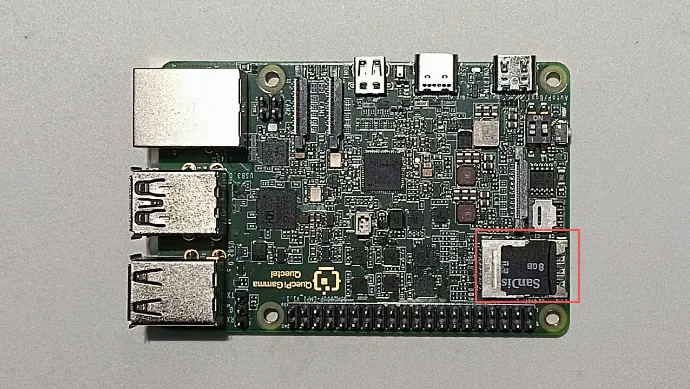
The Quectel Pi M1/L1 intelligent main control board is equipped with a micro SD + Nano SIM 2-in-1 card slot and supports the SD 3.0 protocol.
Note: The upper slot is the micro SD card slot, and the lower slot is the Nano SIM card slot.
Function Usage
System Detection
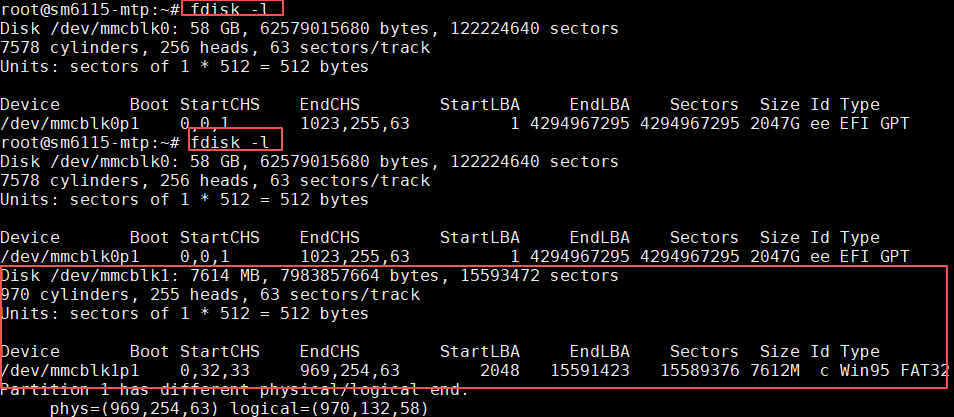
After inserting the SD card, run the following command to check whether the system has detected the device:
fdisk -l
By comparing the command output before and after inserting the SD card, you can confirm that the system has successfully detected the SD card:
Mounting and Unmounting
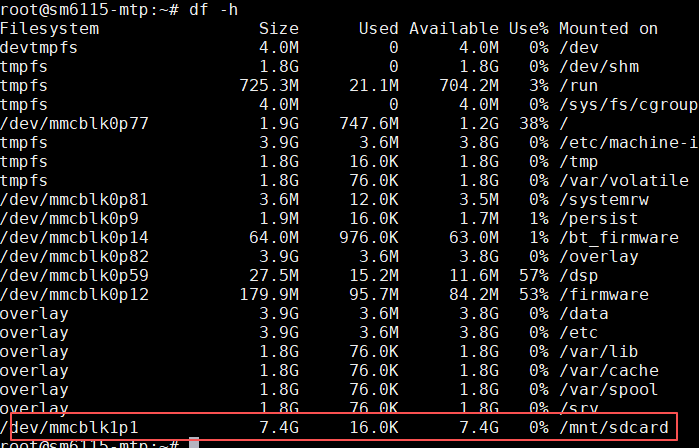
Check the mount path:
df -h
As shown below, the device has been automatically mounted to /mnt/sdcard:
View the files under the mounted directory:
ls /mnt/sdcard
Mount the SD card to another directory:
sudo mkdir -p /media/sdcard
sudo mount /dev/mmcblk1p1 /media/sdcard
Check the mount result:
ls /media/sdcard
Unmount the SD card after use:
sudo umount /media/sdcard
Tip: Unmount the SD card before removing it to prevent data corruption.
File Operations and Permissions
When a normal user accesses the SD card, permission issues may occur. Run the following commands to change the owner of the mount point:
sudo chown <username> /mnt/sdcard
sudo chmod 755 /mnt/sdcard
Replace <username> with the current login user name. After the change, you can read and write files in the /mnt/sdcard directory normally.