Face transformation
Copyright © Quectel Wireless Solutions Co., Ltd. 2026. All rights reserved.
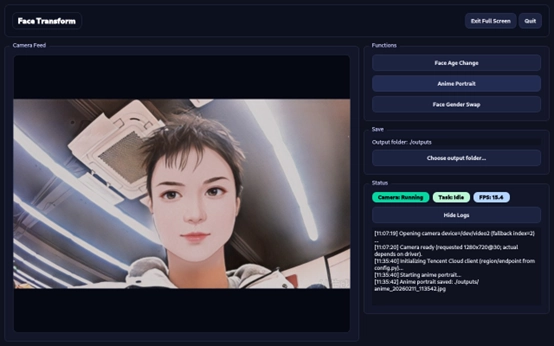
This document introduces the face transformation function based on a USB camera and its usage method. This function implements face effect processing through cloud interfaces and provides a graphical interactive interface to help you quickly deploy and verify effects. After completing environment preparation, dependency installation, and parameter configuration, you can run the project on the Quectel Pi H1 smart single-board computer to reproduce the face transformation effect and output the results.
Core supported functions:
Face age transformation: generate face effects of different age stages and synthesize videos for playback.
Portrait anime stylization: convert portraits into anime-style images.
Face gender conversion: generate gender conversion results for a single face in the form of a full image.
In addition, the project supports automatic identification and activation of camera devices, and outputs running status and log information, making it easy for you to monitor task progress and troubleshoot problems.
Development resource summary
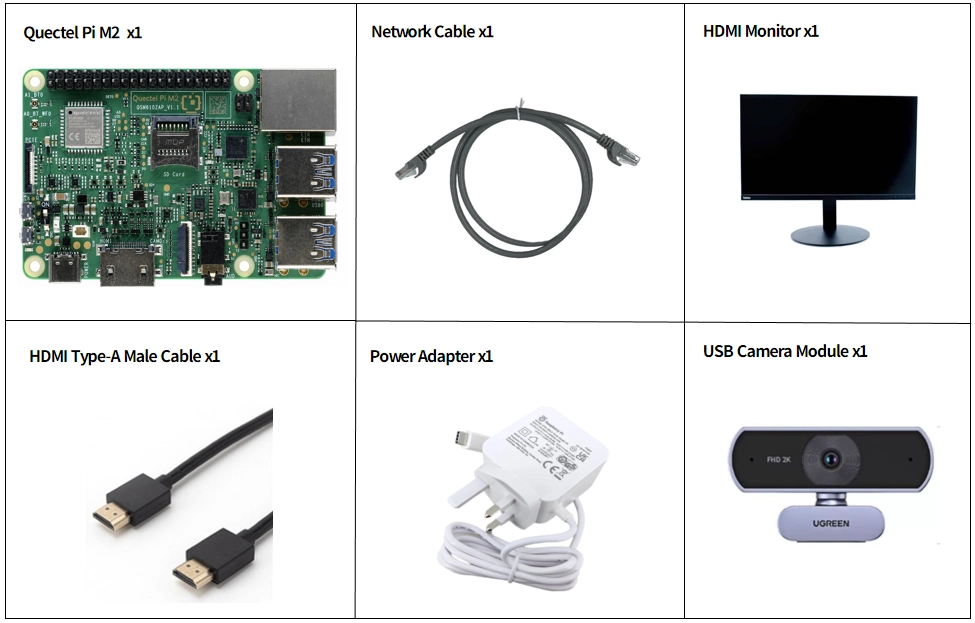
Development component list
Note: The development accessories are for reference only. Different development environments may vary. For example, if you develop via SSH remote connection, a display may not be required.
Accessory |
Quantity |
Specifications |
|---|---|---|
Quectel Pi M2 Smart Single-Board Computer |
1 |
- |
USB-C Power Cable & Charger |
1 |
Official 45W USB Type-C Power Supply for Raspberry Pi 5, White Color, US Plug |
HDMI Type-A Male Cable |
1 |
HDMI 2.0; cable length 1 m; connectors: HDMI-A (male) to HDMI-A (male) |
Ethernet Cable |
1 |
Length: 1m; Speed: Gigabit |
USB Camera Module |
1 |
|
Display |
1 |
24-inch HDMI Monitor |
Display |
1 |
24-inch HDMI monitor |
Accessory physical reference
Quick start
Development preparation
The Quectel Pi H1 smart single-board computer comes with the Debian 13 system image pre-installed. Therefore, you do not need to flash the system image again and follow the steps below.
Hardware connections
Complete all hardware connections by following the steps below (the step numbers correspond to the labels in the interface diagram):
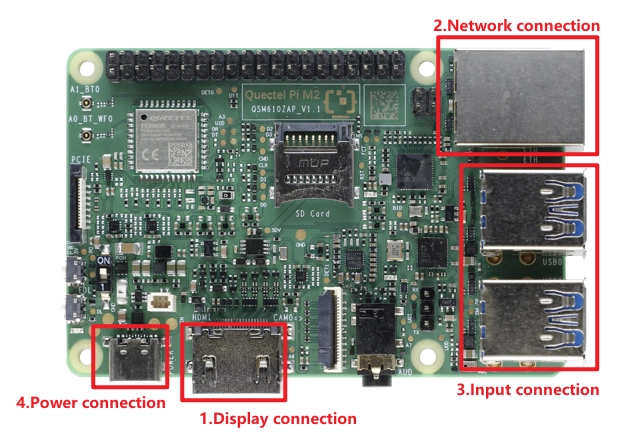
Display Connection: Choose the connection method based on your monitor’s interface. Here we use Option 2: connect one end of the Micro HDMI cable to the main board’s Micro HDMI port and the other end to the monitor’s HDMI port.
Option 1 (HD): Connect one end of the FPC ribbon cable to the MIPI port on the Quectel Pi M2, and the other end to the monitor’s MIPI port. Refer to the MIPI for details.
Option 2 (Compatible): Connect one end of the HDMI cable to the HDMI port on the Quectel Pi M2, and the other end to the monitor’s HDMI port.
Network Connection: Connect the Quectel Pi M2 Ethernet port to the router’s LAN port using an Ethernet cable.
Peripheral Connection: Plug the USB keyboard, mouse, and USB camera into the USB-A ports on the Quectel Pi M2. For wireless keyboard/mouse, simply plug the receiver into a USB port.
Power Connection: Finally, plug the USB-A end of the power cable into the power adapter, and the USB-C end into the power port on the Quectel Pi M2.
Project implementation
Update software sources
Execute the following command to update the system software sources:
sudo apt update
Install system dependencies
Install basic dependency packages:
sudo apt install -y python3 python3-venv python3-pip ffmpeg git vim
Install dependencies related to the graphical interface:
sudo apt install -y libxcb-cursor0 libxkbcommon-x11-0 \
  libxcb-xinerama0 libxcb-icccm4 libxcb-image0 libxcb-keysyms1 libxcb-render-util0
Create a virtual environment
Create a new project directory:
mkdir -p ~/Project
Enter the project directory and create a Python virtual environment:
cd ~/Project
python3 -m venv .venv
Activate virtual environment
source ~/Project/.venv/bin/activate
Download sample code
cd ~/Project
git clone https://github.com/Quectel-Pi/demo-face-transform.git
Upgrade pip
pip install --upgrade pip
Install project dependencies
pip install -r requirements.txt
Note
Ensure that the virtual environment is activated and execute this command in the demo-face-transform directory (if the path does not match, adjust requirements.txt path ).
Configure secret keys
Before using the face transformation service, activate the relevant Tencent Cloud services and obtain the API keys (SecretId and SecretKey) from the Tencent Cloud Access Management console. For details, see Tencent Cloud portrait transformation API documentation.
Method 1: Read the secret keys from environment variables (example):
export TENCENTCLOUD_SECRET_ID="SecretId"
export TENCENTCLOUD_SECRET_KEY="SecretKey"
Method 2: Configure through the startup script
Edit the start.sh script and fill in SecretId and SecretKey.
Run program
Configure SecretId and SecretKey in start.sh:
cd demo-face-transform/src
chmod +x start.sh
./start.sh
Configure remote graphical interface access
To run graphical interface programs in an SSH remote session, complete the following configuration:
Execute the permission configuration command in the local desktop terminal of the device:
xhost +SI:localuser:pi
This command allows the local pi user to access the current X11 display service.
Set the graphical display environment variables in the SSH remote session:
export DISPLAY=:0
export XAUTHORITY=/home/pi/.Xauthority
After the configuration is complete, you can run graphical interface programs in the SSH session.
Application demo
Technical support and contributions
If you encounter any issues during use, submit a technical inquiry to the Quectel official forum. Our technical support team will respond promptly.
Project open-source repository: https://github.com/Quectel-Pi/demo-face-transform
Welcome to submit an issue to report a problem or a pull request to improve the code.