Light music player
Copyright © Quectel Wireless Solutions Co., Ltd. 2026. All rights reserved.
The light music player is a multimedia demo project based on the Quectel Pi M2 smart single-board computer.
This project plays local music files and analyses the audio signal in real time to drive a 16×16 WS2812 RGB full-color LED matrix display, producing lighting effects that change in sync with the music rhythm and linking the music with the lighting.
This project demonstrates the Quectel Pi M2’s capabilities in audio processing, SPI peripheral control, and multi-threaded real-time display. It can serve as a reference example for applications such as music visualization, ambient lighting, and LED displays.
Development resources summary
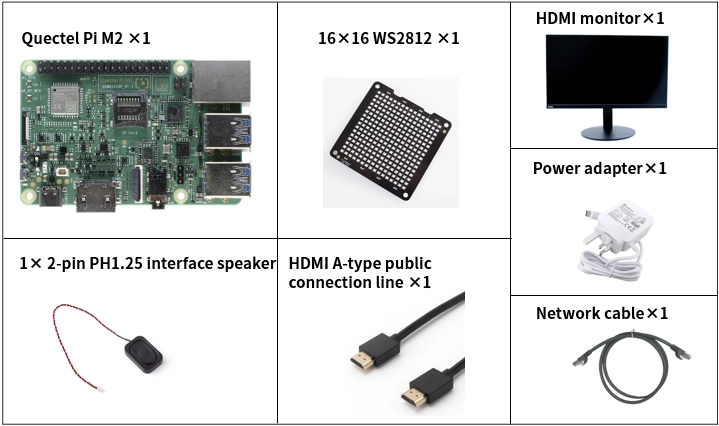
Development accessories list
Accessory name |
Quantity |
Specifications |
|---|---|---|
Quectel Pi M2 smart single-board computer |
1 |
- |
16×16 WS2812 RGB full-color LED matrix display |
1 |
16×16 WS2812 RGB full-color LED matrix display |
PH1.25 2-pin interface speaker |
1 |
|
Power adapter |
1 |
|
HDMI A-type public connection line |
1 |
HDMI 2.0; Length of the cable: 1 meter; Interface: HDMI-A (male connector) - HDMI-A (male connector) |
Ethernet cable |
1 |
Length: 1 m; Transmission rate: Gigabit |
HDMI monitor |
1 |
24-inch HDMI monitor |
Physical reference of accessories
Get started quickly
Development preparation
The Quectel Pi M2 smart single-board computer comes with the Debian 13 system image pre-installed, so there is no need to flash the image again. Just follow the steps below.
Hardware connection
Peripheral connection
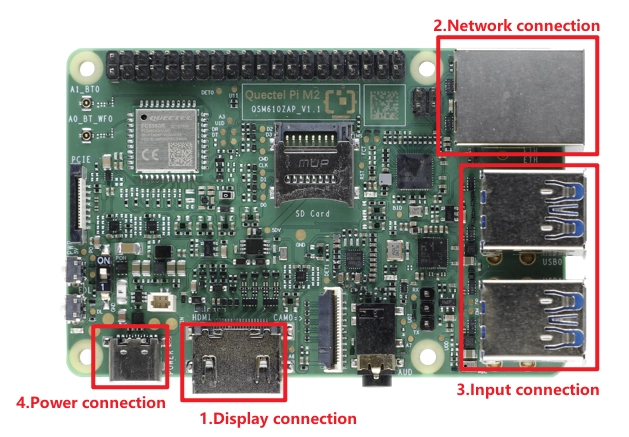
Display Connection: Choose the connection method based on your monitor’s interface. Here we use Option 2: connect one end of the Micro HDMI cable to the main board’s Micro HDMI port and the other end to the monitor’s HDMI port.
Option 1 (HD): Connect one end of the FPC ribbon cable to the MIPI port on the Quectel Pi M2, and the other end to the monitor’s MIPI port. Refer to the MIPI for details.
Option 2 (Compatible): Connect one end of the HDMI cable to the HDMI port on the Quectel Pi M2, and the other end to the monitor’s HDMI port.
Network Connection: Connect the Quectel Pi M2 Ethernet port to the router’s LAN port using an Ethernet cable.
Peripheral Connection: Plug the USB keyboard, mouse, and USB camera into the USB-A ports on the Quectel Pi M2. For wireless keyboard/mouse, simply plug the receiver into a USB port.
Power Connection: Finally, plug the USB-A end of the power cable into the power adapter, and the USB-C end into the power port on the Quectel Pi M2.
6×16 WS2812 connection
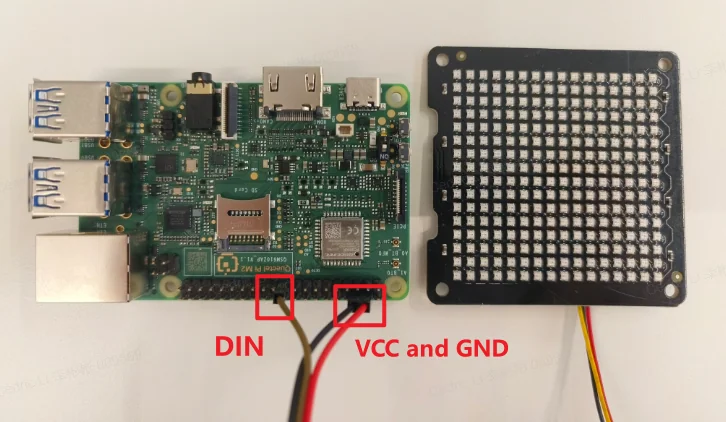
The 16×16 WS2812 RGB full-color LED matrix display is connected to the Quectel Pi M2 smart single-board computer through the SPI. Its data input end should connect to the corresponding pin on the Quectel Pi M2 (see the figure below for the wiring).
Project implementation
Prerequisites installation
After confirming that the device is connected to the network, open the terminal and run the following command:
sudo apt update && sudo apt install -y pulseaudio-utils python3-numpy python3-spidev ffmpeg
The command above updates the software sources and installs the libraries required to run the project, including:
pulseaudio-utils: Provides audio utilities such as pacat to play decoded PCM audio data on the system;
python3-numpy: Used for FFT spectrum analysis and numerical computation of audio signals, supporting spectrum-based lighting effects;
python3-spidev: Enables Python access to the SPI interface, used to drive the WS2812 RGB full-color LED matrix display;
ffmpeg: Decodes audio files such as files in MP3 and WAV format into a PCM data stream for audio playback and real-time analysis.
Obtaining the code
Go to the GitHub repository to get the code and download it to the Quectel Pi M2. If you are accessing the device remotely, refer to SCP file copy for file transfer instructions.
Preparing music files
Copy the music files (MP3 and WAV formats are supported) to the user’s Music directory, such as /home/pi/Music.
After the program starts, it automatically scans this directory for music files and generates a playlist.
Application demo
Running the program
Run the following commands in the project directory to start the program:
cd demo-light_music_player
sudo python3 light_music_player.py
The lighting effect can be configured as mode1 or mode2. After the program starts, it automatically plays music and displays lighting effects that change with the music rhythm on the 16×16 WS2812 RGB full-color LED matrix display.
After the program is running, the terminal shows the key controls (n for the next track, u for the previous track, q or Ctrl+C to exit the program).

Lighting effect description
Notes: 16×16 WS2812 LED panel layout
The physical wiring of the 16×16 WS2812 RGB full-color LED matrix display panel may differ between vendors. The panel used in this project is laid out as follows:
Starting LED position: bottom-left corner (LED 0)
Direction of the first row: left to right (LED 0 → LED 15)
Row direction: bottom to top
Wiring pattern: serpentine
In other words, the first row runs from left to right, the second row returns from right to left, and so on upward.
All lighting effects in the program (spectrum direction, raindrop direction, and so on) are mapped according to this layout.
If the panel you use is not wired as described above, the display may appear reversed or misaligned. In that case, adjust the LED matrix mapping configuration according to the actual wiring of the panel.
Spectrum push effect of mode1
This mode is based on 16-band spectrum analysis of the audio:
Each column of the LED matrix corresponds to the energy of one band;
The bar height changes in real time with the spectrum energy;
Supports smooth rising, slow falling, and peak-hold effects;
When the music rhythm changes abruptly, the overall display produces a pronounced pushing visual effect.
Raindrop lighting effect of mode2
This mode simulates raindrops falling from the top of the display:
The raindrop generation rate changes dynamically with the music intensity;
Supports trailing effects and background color filling;
The louder the volume, the denser the raindrops and the higher the brightness.
Technical support and contributions
If you encounter any problems during use, please submit a technical inquiry on the Quectel official forum. The Quectel technical support team will respond promptly.
Project open-source repository: https://github.com/Quectel-Pi/demo-light-music-player
You are welcome to submit issues to report problems or pull requests to contribute to code improvements!