Edge computing playground
Copyright © Quectel Wireless Solutions Co., Ltd. 2026. All rights reserved.
Introduction
AI Playground User Experience Platform aims to provide industry users with “out-of-the-box” software-hardware integrated AI experiences. Whether individual developers or enterprise innovation teams, AI Playground provides full-chain support, efficiently transforming complex AI technologies into practical deployment paths.
This section introduces the deployment guide for Quectel AI algorithm SDKs on the RK3576 M2 Linux platform, covering two algorithm types: human keypoint detection and facial attributes detection.
Integrated Algorithm Services
Algorithm Type |
Description |
SDK |
|---|---|---|
Human keypoint detection |
17 human keypoints + sitting posture detection (cheek support / head bowing / unbalanced shoulder) |
PeopleKptDet |
Facial attributes detection |
Face detection + emotion/age/gender classification |
facial_attributes_detection |
Pre-deployment Preparation
Development Environment Requirements
Item |
Requirement |
|---|---|
Development board |
Quectel PI M2 RK3576 Board |
Operating system |
Ubuntu 20.04+ / Debian (aarch64, glibc 2.31+) |
NPU |
RK3576 built-in 6 TOPS (driver v0.9.8) |
RKNN runtime |
librknnrt.so 2.3.2 (bundled in SDK) |
Inference engine |
ModelInfer (libinference.so, bundled in SDK) |
Connection |
adb (board is rooted) |
Note: Both SDKs are Quectel-delivered dynamic library packages (lib/*.so + 3rd_party/ + models/ + demo), ready to use after extraction — no compilation required.
Algorithm 1: Human Keypoint Detection (PeopleKptDet)
SDK Overview
Human keypoint + sitting posture detection SDK v1.2 (RK3576 Ubuntu aarch64). Detects 17 human keypoints in images and analyzes sitting postures: cheek support (CHEEK_SUPPORT), head bowing on desk (HEAD_BOWING_BEND_ON_DESK), unbalanced shoulder (UNBALANCED_SHOULDER). Inference based on ModelInfer + RKNN NPU.
Run (Measured on Board)
adb push PeopleKptDet_RK3576 /data/local/tmp/
cd /data/local/tmp/PeopleKptDet_RK3576
export LD_LIBRARY_PATH=$PWD/lib:$PWD/3rd_party/modelinfer:$PWD/3rd_party/rknn:$PWD/3rd_party/jsoncpp/lib:$PWD/3rd_party/opencv/lib
./demo images/frame_1.jpg 0.25 0.45
Measured Results (2026-09-01, RK3576 M2)
Test Image |
Result |
Keypoints |
Time |
|---|---|---|---|
frame_1.jpg |
CHEEK_SUPPORT |
17 |
25.17 ms |
frame_2.jpg |
HEAD_BOWING |
17 |
25.19 ms |
frame_3.jpg |
UNBALANCED_SHOULDER |
17 |
25.22 ms |
Detection results:
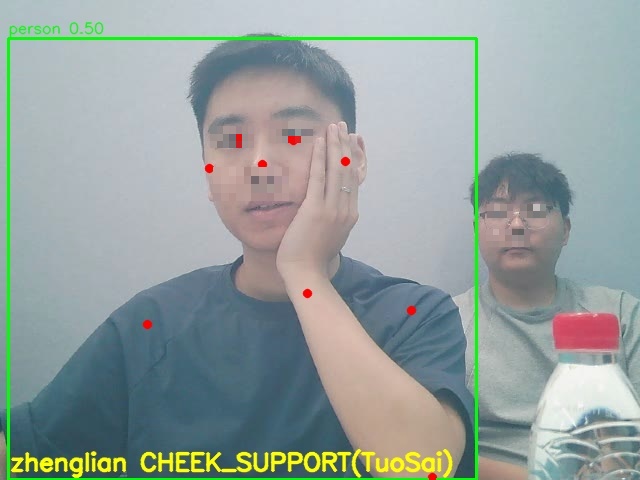
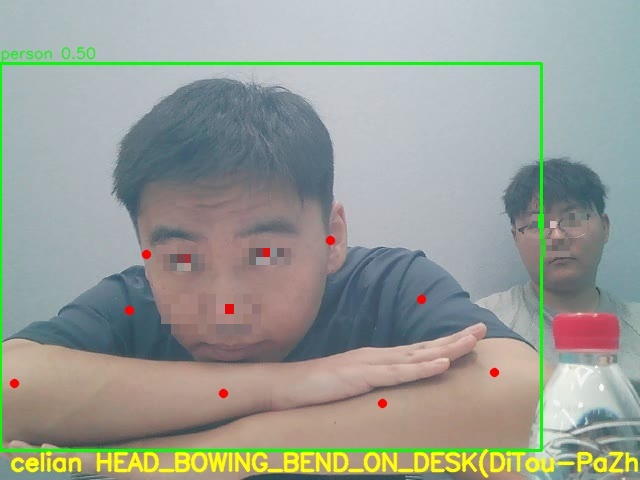
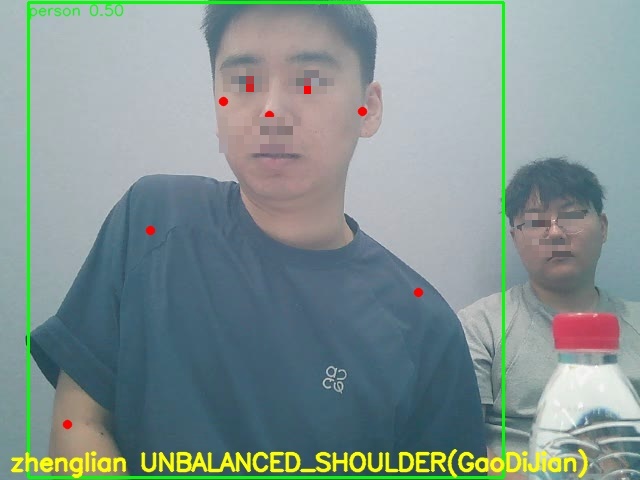
Interface Highlights
init(model, license, module=3, auth_code): RK3576 uses module=3 (DEV_RK3576)
inference(BGR image, rows, cols, ch, PoseFrameResult): returns human box + 17 keypoints + posture result
Authorization: official auth code or 30-minute trial (no code)
Algorithm 2: Facial Attributes Detection (facial_attributes_detection)
SDK Overview
Facial attributes detection SDK v1.2 (RK3576 Ubuntu aarch64). WiderFace face detection + FER emotion/age/gender classification in a single-process cascade: one BGR image → detect all faces → crop each → FER classify → emotion/gender/age results per face. Inference based on ModelInfer + RKNN NPU.
Run (Measured on Board)
adb push facial_attributes_detection_RK3576 /data/local/tmp/
cd /data/local/tmp/facial_attributes_detection_RK3576
export LD_LIBRARY_PATH=$PWD/lib:$PWD/3rd_party/modelinfer:$PWD/3rd_party/rknn:$PWD/3rd_party/opencv/lib
./demo images/input.jpg 0.25 0.20
Measured Results (2026-09-01, RK3576 M2)
inference ret=0 faces=1
face[0] box=[400.0,111.5,164.0,196.8] det=0.793 emotion=happy(0.537) gender=female(0.743) age=32
save_result: outputs/input.jpg_detected.jpg + outputs/input.jpg.json
Detection result:
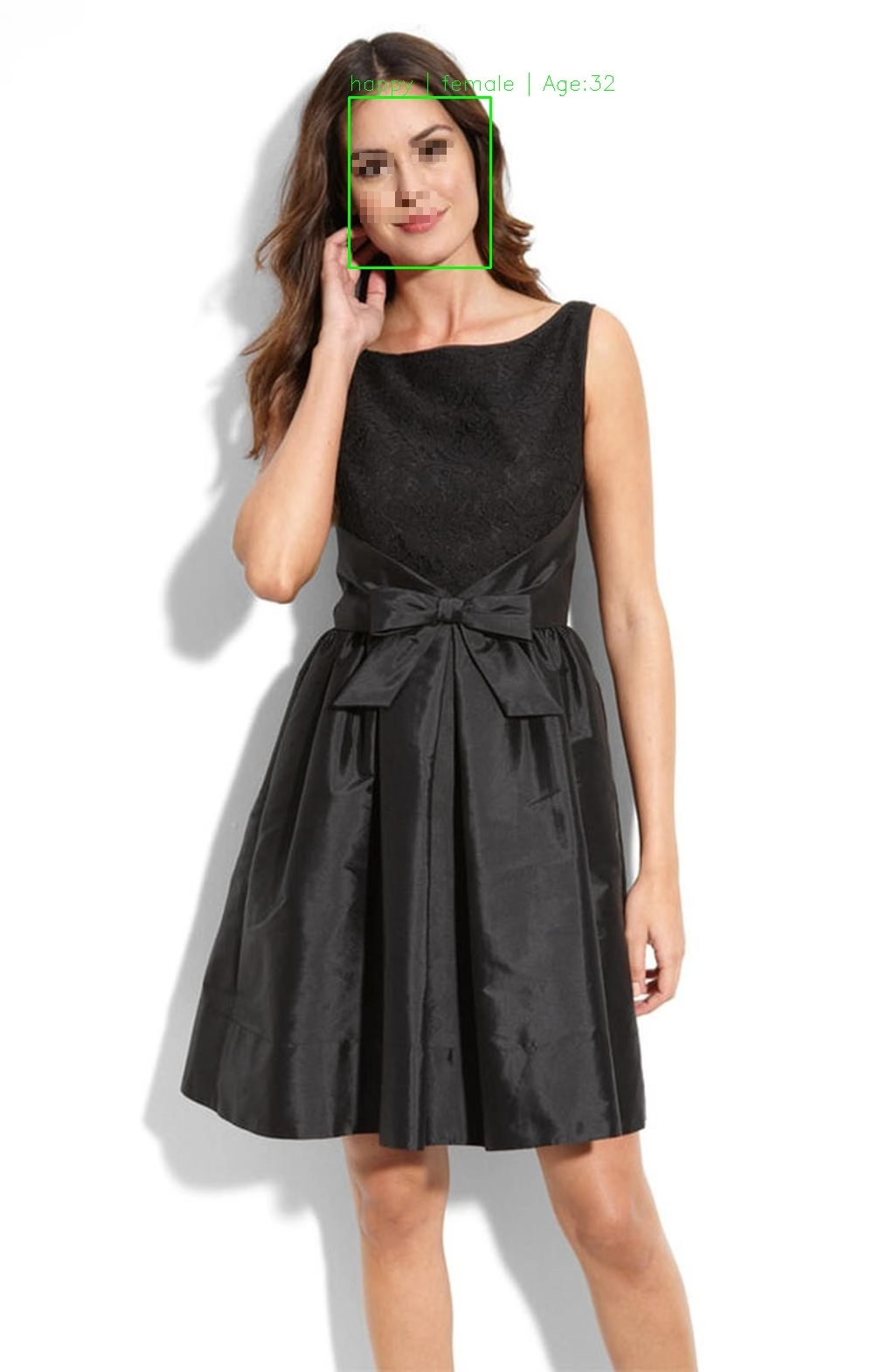
Interface Highlights
init(model1=widerface detection, model2=FER classification, module, auth_code)
inference(BGR image, FaceContext): returns box + emotion/gender/age per face
Module ID: FAD_MODULE_RK3576=3
Demo
Both SDKs include prebuilt demo programs, one-click run via command line (see each algorithm’s measured section).
Human keypoint detection: ./demo images/frame_1.jpg 0.25 0.45 → outputs/frame_1_detected.jpg (green box + red keypoints + posture text)
Facial attributes detection: ./demo images/input.jpg 0.25 0.20 → outputs/output.jpg (face box + attribute annotation)
Common Troubleshooting
Problem |
Possible Cause |
Solution |
|---|---|---|
libopencv_core.so.4.2 not found |
OpenCV library path not set |
export LD_LIBRARY_PATH including 3rd_party/opencv/lib |
init returns -1 |
Wrong auth code / model path |
Check auth code and model path |
30-minute trial expired |
No auth code passed |
Pass the official auth code |
Slow inference |
NPU frequency not fixed |
Fix NPU frequency at 950MHz (see NPU usage guide) |
More Algorithms at AlgoStore
AlgoStore Algorithm Marketplace
Introduction
AlgoStore is a one-stop AI algorithm service platform developed by Quectel. As a one-stop AIoT algorithm platform, AlgoStore is like a “supermarket” gathering rich cutting-edge AI algorithms. With powerful algorithm adaptation capabilities, convenient algorithm customization services, and a complete AIoT ecosystem, it allows enterprises and developers to easily obtain suitable AI algorithms like “shopping for products”.
Core Features
Leading algorithms: Gathers advanced AI algorithms in vision, audio and other fields, verified by real customer projects
Hardware adaptation: Covers mainstream chips including Qualcomm, Unisoc, Rockchip, MediaTek
Deep customization: Globalized layout and customer service network for differentiated business needs
Contact Us
To get more algorithm experiences or algorithm integration SDKs, please contact us on the official website!
AIDE Development Toolchain
Introduction
AIDE (AI Development Tools & Engines) is Quectel’s one-stop AI development toolchain platform, covering the full chain of “model conversion - optimization - on-device inference”.
Core Modules
ModelForge AI model conversion & optimization tool: Supports multiple mainstream model formats and chip platforms, with channel quantization, bit-width quantization, model calibration and other optimization techniques.
ModelInfer AI inference engine: Deeply adapts to CPU/GPU/NPU heterogeneous computing units, supporting multi-computing-unit collaborative inference.
Model Conversion and Deployment
This section demonstrates converting a mobilenet v3 model to on-device deployment.
Model Conversion
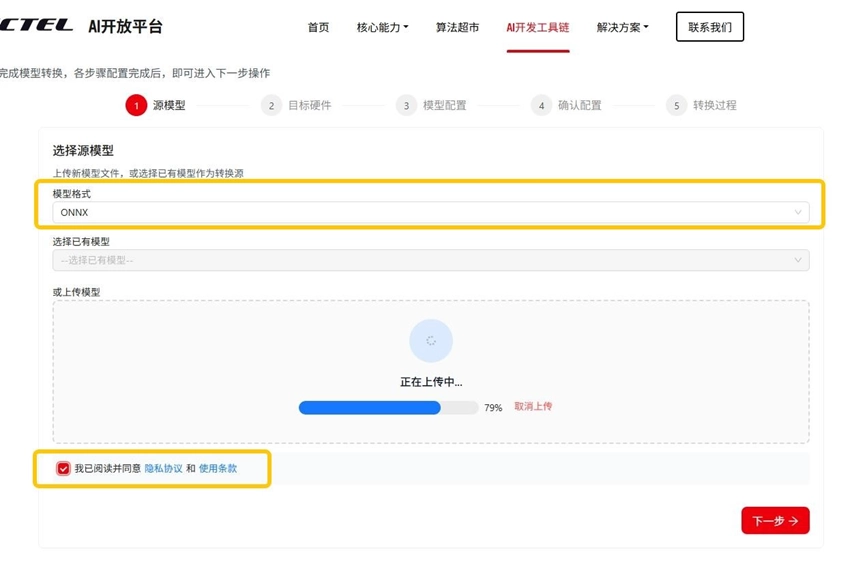
Model upload: Log in to the AI open platform, select the AI development toolchain, choose the model format, agree to the privacy policy, upload the model.
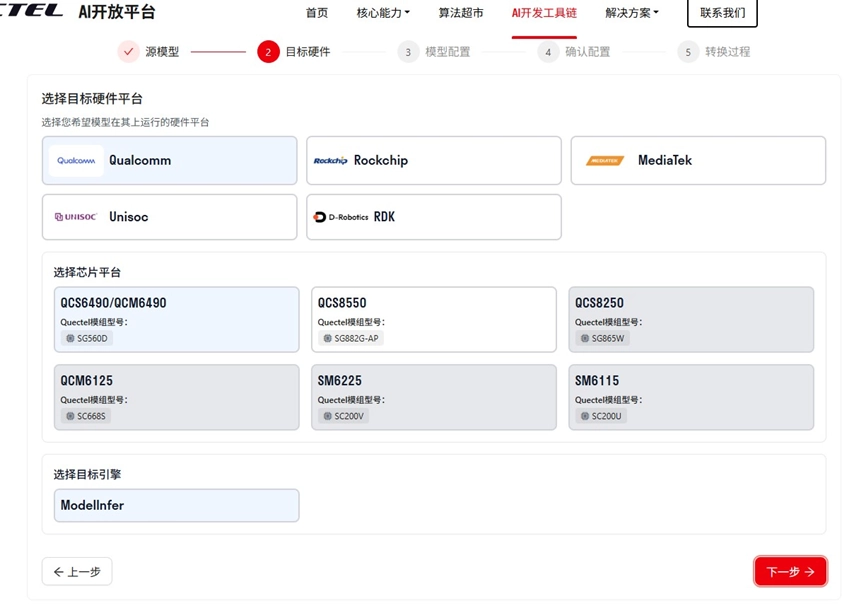
Select target hardware: Select the target hardware platform, chip platform, and inference engine.
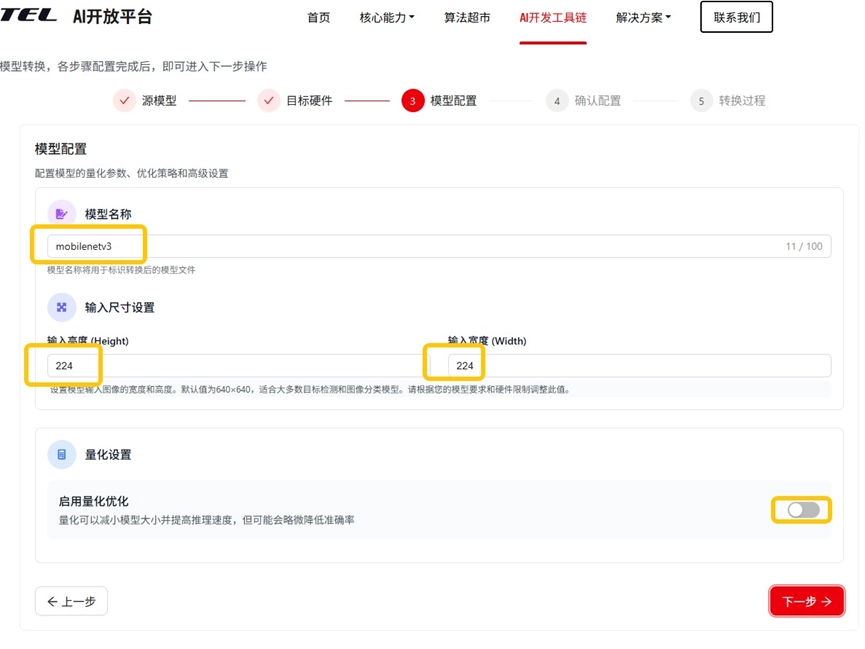
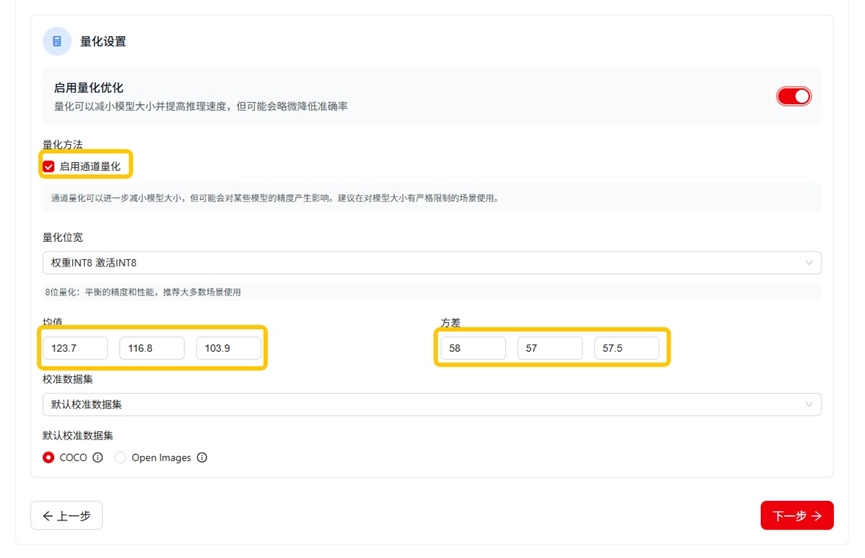
Model configuration: Set model name and input size. Model quantization can reduce size and improve speed; configure channel optimization, quantization bit width, input mean/variance, and calibration dataset (default COCO).
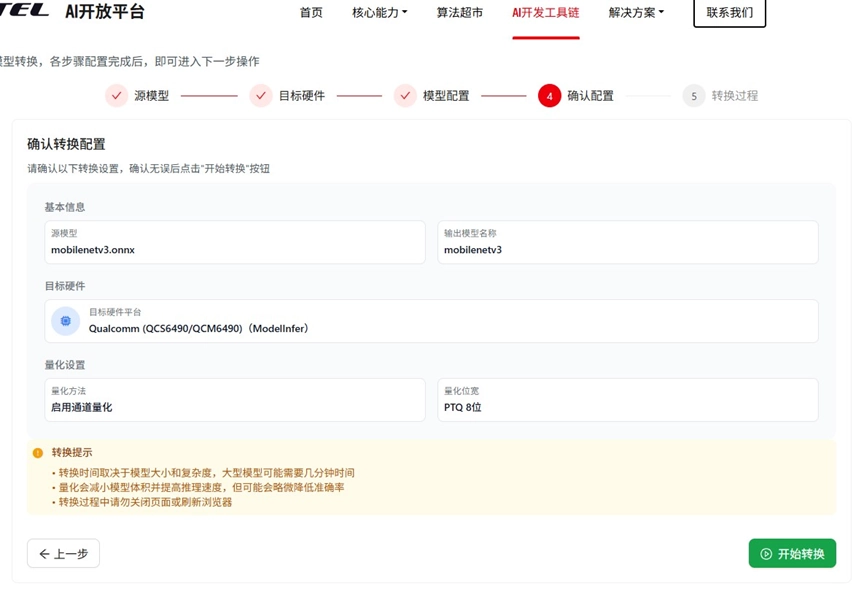
Confirm configuration: Review the conversion info and proceed.
Model conversion: After successful conversion, download the model.
Deployment Example
CMake integration: Set the ModelInfer SDK path in CMakeLists.txt and use find_package to locate the SDK package:
cmake_minimum_required(VERSION 3.1)
project(MODEL_INFER_TEST)
set(CMAKE_CXX_STANDARD 14)
set(OpenCV_DIR "${CMAKE_CURRENT_SOURCE_DIR}/third_party/OpenCV-android-sdk/sdk/native/jni")
find_package(OpenCV REQUIRED)
find_library(log-lib log)
set(ModelInfer_DIR ${CMAKE_CURRENT_SOURCE_DIR}/model_infer_sdk/0.0.1/Android_aarch64_Release_Q)
find_package(ModelInfer REQUIRED)
include_directories(${ModelInfer_INCLUDE_DIRS})
add_definitions(${ModelInfer_DEFINITIONS})
include_directories(${OpenCV_INCLUDE_DIRS})
add_executable(${PROJECT_NAME} main.cc)
target_link_libraries(${PROJECT_NAME} ${ModelInfer_LIBRARIES} ${OpenCV_LIBRARIES} log)
SDK usage example: This example uses mobilenet classification. Declare the inference engine (QnnEngine), call Authenticate, then Init. Models downloaded from the conversion platform are encrypted, so set the second Init parameter to true. Prepare input/output parameters — ModelInfer supports multiple inputs/outputs; buffer memory is created and managed by the user. Finally call Inference to complete one inference cycle.
Compile and run:
adb shell "cd /data/local/tmp/model_infer_demo/ && chmod +x ./MODEL_INFER_TEST && export LD_LIBRARY_PATH=/data/local/tmp/model_infer_demo/:$LD_LIBRARY_PATH && ./MODEL_INFER_TEST ./mobilenetv3_ctx.bin ./20260204-101425.jpg"
init success
Top-5 Predictions:
Class ID: 340, Probability: 0.0700765, Class Name: zebra
Class ID: 396, Probability: 0.0140236, Class Name: lionfish
Class ID: 117, Probability: 0.0109065, Class Name: chambered nautilus
Class ID: 506, Probability: 0.0106358, Class Name: coil
Class ID: 56, Probability: 0.00643312, Class Name: king snake