40-Pin Expansion Header
Copyright © Quectel Wireless Solutions Co., Ltd. 2026. All rights reserved.
Quectel Pi smart controller board provides a standard 40-pin GPIO expansion header that supports various peripheral interfaces, including GPIO, I2C, SPI, UART, and PWM. The following sections describe how to test these interfaces.
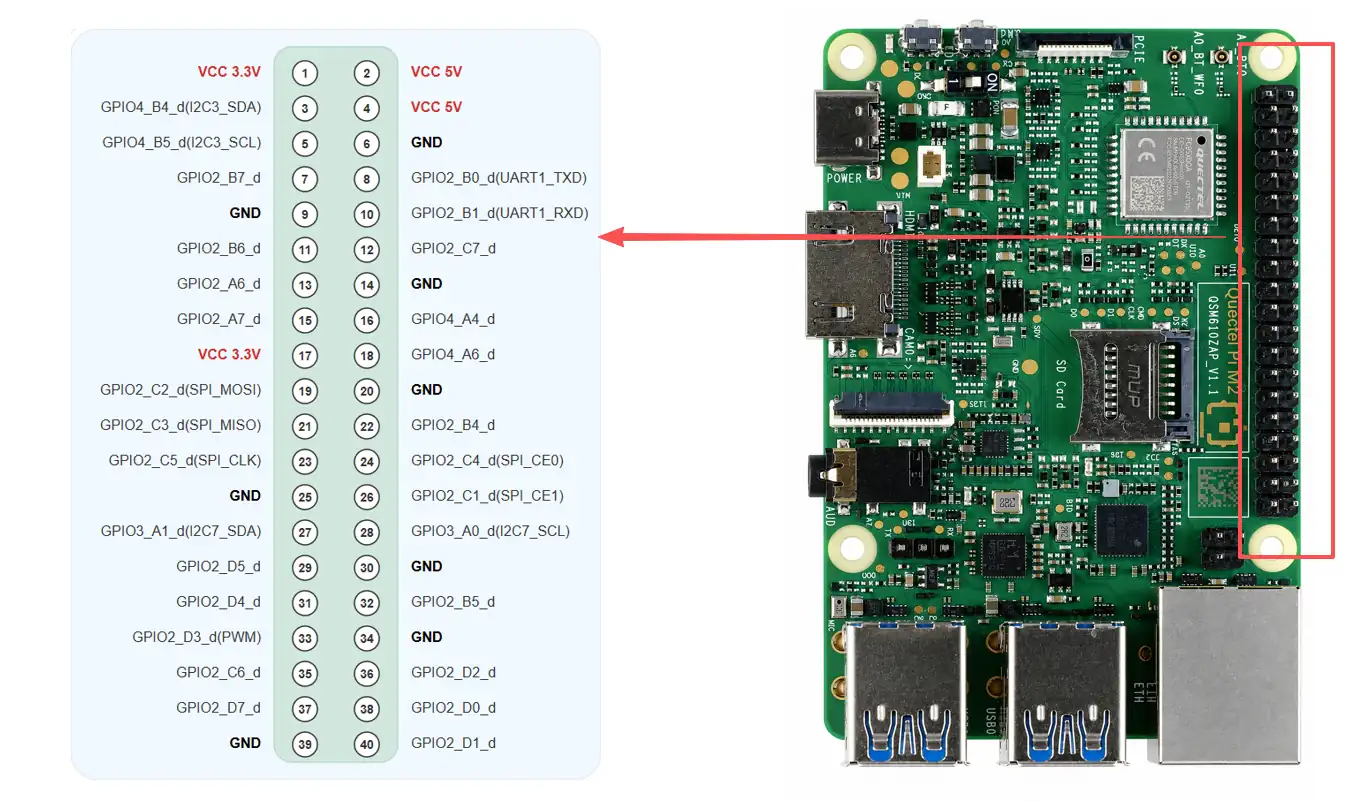
Pin Definition
Function10 |
Function9 |
Function8 |
Function7 |
Function6 |
Function5 |
Function4 |
Function3 |
M2 GPIO# |
Pin# |
Pin# |
M2 GPIO# |
Function3 |
Function4 |
Function5 |
Function6 |
Function7 |
Function8 |
Function9 |
Function10 |
|---|---|---|---|---|---|---|---|---|---|---|---|---|---|---|---|---|---|---|---|
VCC 3V3 |
1 |
2 |
VCC 5V |
||||||||||||||||
CAN1_RX_M2 |
I2C3_SDA_M0 |
UART2_RX_M1 |
- |
GPIO4_B4_d(I2C3_SDA) |
3 |
4 |
VCC 5V |
||||||||||||
CAN1_TX_M2 |
PCIE0_CLKREQN_M2 |
I2C3_SCL_M0 |
UART2_TX_M1 |
- |
GPIO4_B5_d(I2C3_SCL) |
5 |
6 |
GND |
|||||||||||
I2C8_SDA_M2 |
UART8_CTSN_M1 |
UART7_RX_M0 |
SAI0_LRCK_M0 |
ETH0_RXD2_M1 |
GPIO2_B7_d |
7 |
8 |
GPIO2_B0_d(UART1_TXD) |
SDMMC1_D2_M1 |
ETH0_TXD1_M1 |
SAI0_SDI0_M0 |
PDM0_SDI3_M3 |
UART1_TX_M1 |
||||||
GND |
9 |
10 |
GPIO2_B1_d(UART1_RXD) |
SDMMC1_D3_M1 |
ETH0_TXD0_M1 |
SAI0_SDI1_M0 |
PDM0_SDI2_M3 |
UART1_RX_M1 |
|||||||||||
I2C8_SCL_M2 |
UART8_RTSN_M1 |
UART7_TX_M0 |
SAI0_SCLK_M0 |
- |
GPIO2_B6_d |
11 |
12 |
GPIO2_C7_d |
ETH1_TXD1_M0 |
SAI4_LRCK_M3 |
UART4_RTSN_M0 |
I2C5_SDA_M2 |
PWM0_CH1_M2 |
||||||
SPI4_CSN1_M3 |
I2C4_SCL_M2 |
UART8_TX_M1 |
SAI0_SDO0_M0 |
SDMMC1_D0_M1 |
GPIO2_A6_d |
13 |
14 |
GND |
|||||||||||
- |
I2C4_SDA_M2 |
UART8_RX_M1 |
SAI0_SDO1_M0 |
SDMMC1_D1_M1 |
GPIO2_A7_d |
15 |
16 |
GPIO4_A4_d |
SAI4_SCLK_M0 |
PDM1_SDI3_M1 |
- |
SPI3_MOSI_M2 |
UART6_TX_M0 |
I2C4_SCL_M1 |
CAN0_TX_M2 |
||||
VCC 3V3 |
17 |
18 |
GPIO4_A6_d |
SAI4_LRCK_M0 |
PDM1_CLK0_M1 |
- |
SPI3_MISO_M2 |
UART6_RX_M0 |
I2C4_SDA_M1 |
CAN0_RX_M2 |
|||||||||
PWM1_CH2_M2 |
SPI1_MOSI_M1 |
UART11_CTSN_M1 |
PDM1_SDI2_M0 |
SAI2_SCLK_M1 |
- |
GPIO2_C2_d(SPI_MOSI) |
19 |
20 |
GND |
||||||||||
PWM0_CH0_M2 |
SPI1_MISO_M1 |
UART11_RTSN_M1 |
PDM1_SDI3_M0 |
SAI2_LRCK_M1 |
GPIO2_C3_d(SPI_MISO) |
21 |
22 |
GPIO2_B4_d |
SDMMC1_PWREN_M1 |
ETH0_TXD2_M1 |
SAI0_SDI3_M0 |
UART7_CTSN_M0 |
SPI4_MOSI_M3 |
SATA0_ACTLED_M0 |
|||||
PWM1_CH4_M2 |
SPI1_CLK_M1 |
UART11_RX_M1 |
PDM1_CLK0_M0 |
SAI2_SDI_M1 |
GPIO2_C5_d(SPI_CLK) |
23 |
24 |
GPIO2_C4_d(SPI_CE0) |
SAI2_SDO_M1 |
PDM1_SDI0_M0 |
UART11_TX_M1 |
SPI1_CSN0_M1 |
PWM1_CH3_M2 |
- |
|||||
GND |
25 |
26 |
GPIO2_C1_d(SPI_CE1) |
- |
SAI2_MCLK_M1 |
UART9_TX_M0 |
SPI1_CSN1_M1 |
PWM1_CH1_M2 |
|||||||||||
I2C7_SDA_M1 |
SPI3_MOSI_M0 |
UART3_RX_M0 |
SAI3_LRCK_M2 |
ETH0_MDC_M1 |
GPIO3_A1_d(I2C7_SDA) |
27 |
28 |
GPIO3_A0_d(I2C7_SCL) |
- |
SAI3_SCLK_M2 |
UART3_TX_M0 |
SPI3_CLK_M0 |
I2C7_SCL_M1 |
- |
|||||
PWM2_CH5_M2 |
I2C9_SCL_M2 |
UART6_CTSN_M1 |
GPIO2_D5_d |
29 |
30 |
GND |
|||||||||||||
PWM2_CH4_M2 |
I2C9_SDA_M2 |
UART6_RTSN_M1 |
GPIO2_D4_d |
31 |
32 |
GPIO2_B5_d |
SDMMC1_DETN_M1 |
ETH0_RXCLK_M1 |
SAI0_MCLK_M0 |
PDM0_CLK0_M3 |
UART7_RTSN_M0 |
SPI4_MISO_M3 |
SATA1_ACTLED_M0 |
||||||
PWM2_CH3_M2 |
I3C1_SDA_M0 |
UART6_RX_M1 |
GPIO2_D3_d(PWM) |
33 |
34 |
GND |
|||||||||||||
PWM1_CH5_M2 |
I2C5_SCL_M2 |
UART4_CTSN_M0 |
SAI4_SCLK_M3 |
GPIO2_C6_d |
35 |
36 |
GPIO2_D2_d |
CAM_CLK0_OUT_M1 |
SAI4_MCLK_M3 |
UART6_TX_M1 |
I3C1_SCL_M0 |
PWM2_CH2_M2 |
|||||||
PWM2_CH7_M2 |
SPI3_CSN1_M0 |
UART9_CTSN_M0 |
- |
SAI0_SDO3_M0 |
ETH_CLK0_25M_OUT_M1 |
CAM_CLK2_OUT_M1 |
GPIO2_D7_d |
37 |
38 |
GPIO2_D0_d |
- |
SAI4_SDI_M3 |
UART4_TX_M0 |
I2C6_SCL_M2 |
PWM2_CH0_M2 |
||||
GND |
39 |
40 |
GPIO2_D1_d |
ETH1_RXD0_M0 |
SAI4_SDO_M3 |
UART4_RX_M0 |
I2C6_SDA_M2 |
PWM2_CH1_M2 |
- |
||||||||||
GPIO Test
Hardware Connection
Install the GPIO terminal expansion board directly onto the 40Pin header. When a signal is driven high or low, the LED corresponding to that Pin turns on or off.
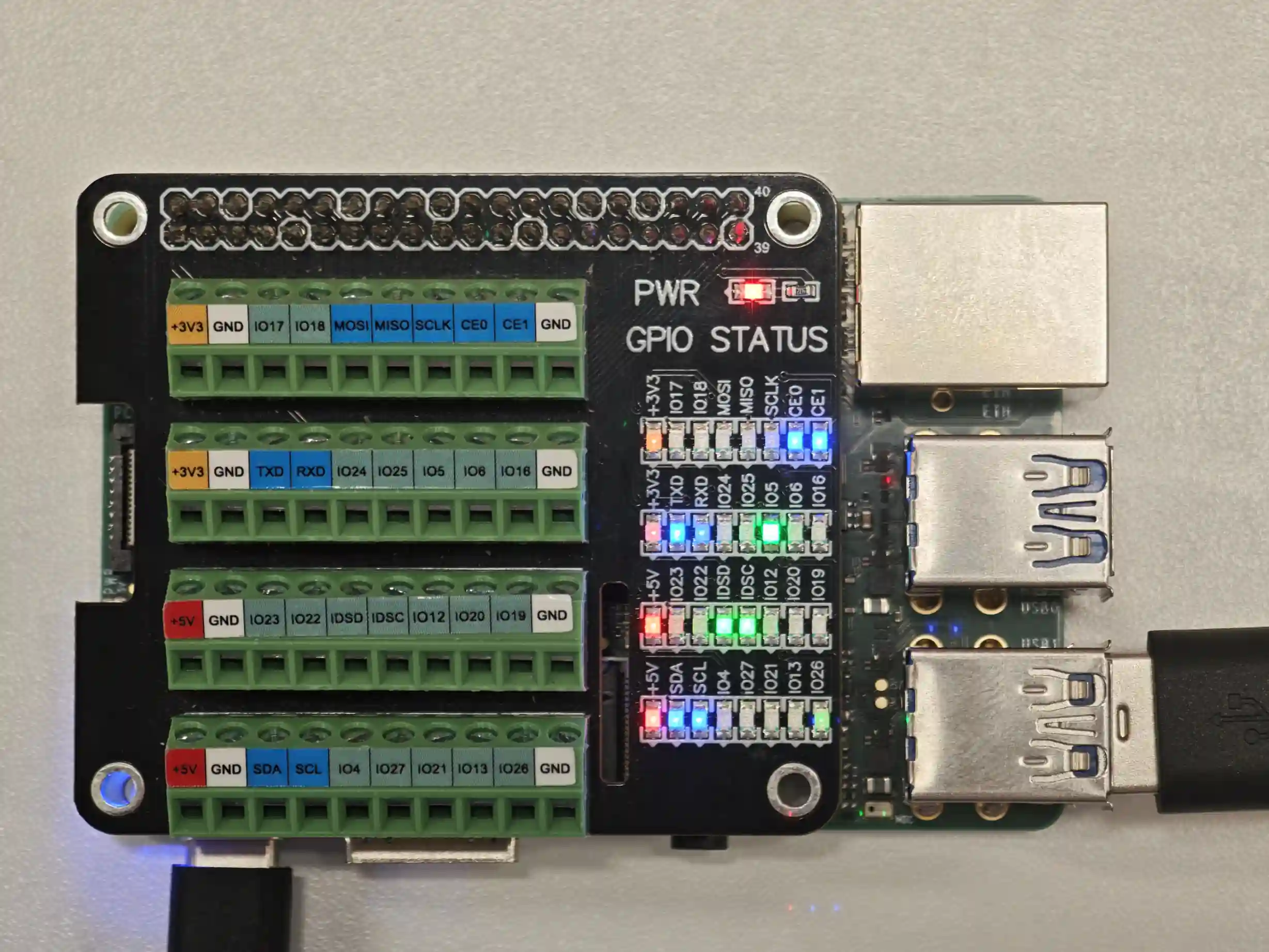
Note: There are currently 16 general-purpose GPIOs. The pins corresponding to the following multiplexed functions are occupied. You can use qpi-config to disable the corresponding multiplexed functions and use the pins as general-purpose GPIOs.
Pin3/5:I2C3
Pin8/10:UART1
Pin19/21/23/24/26:SPI1
Pin27/28:I2C7
Pin33:PWM
Use a multimeter to measure the voltage at the Pin corresponding to the GPIO. The high level should be 3.3V, and the low level should be 0V.
Test Method
Using Pin13(GPIO2_A6_d) as an example, enter adb shell and use the gpiod commands to test the GPIO.
adb shell


# List GPIO controllers
gpiodetect


# View Pin13 GPIO2_A6 information
gpioinfo -c gpiochip2 6


# Read the current level
gpioget -c gpiochip2 6


# Drive high for 10 seconds
gpioset -c gpiochip2 -t 10s,0 6=1


# Drive low for 10 seconds
gpioset -c gpiochip2 -t 10s,0 6=0
GPIO Interrupt Test Method: Connect the GPIO under test to a button or an external signal source so that the pin level changes. Use gpiomon to monitor rising-edge and falling-edge events on the GPIO. GPIO2_A6_d is again used as the example here.
# Read the current level of GPIO2_A6
gpioget -c gpiochip2 6


# Monitor rising-edge and falling-edge events on GPIO2_A6 and exit after 5 events
gpiomon -n 5 -e rising  -c gpiochip2 6
gpiomon -n 5 -e falling -c gpiochip2 6
I2C Test
Environment Sensor HAT Test:
pin3 and pin5 of the 40-pin header are configured as the I2C data and clock pins by default. To test the I2C interface, an external I2C device is required. This test uses the Waveshare Environment Sensor HAT, whose corresponding device node is /dev/i2c- 3。
This test uses the Waveshare Environment Sensor HAT, connected through the 40-pin header.
Hardware Connection Diagram:
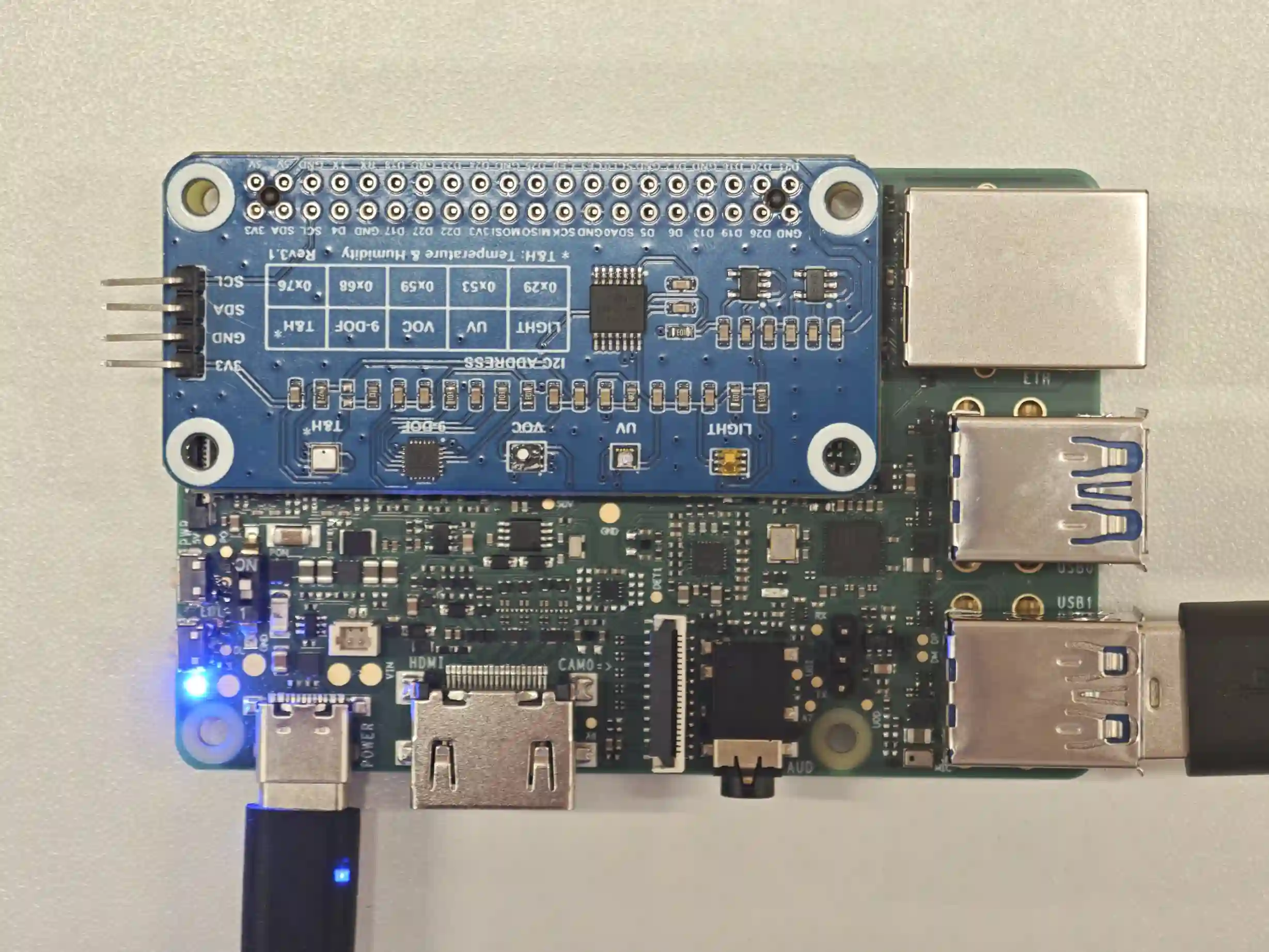
Quectel Pi M2 with the expansion board installed
SPI Test
On the 40-pin header, Pin19/21/23/24/26 are configured for the SPI function by default. The corresponding device node is SPI1 。
View Serial Devices
Use the following command to view all serial devices in the system:
ls /dev/spidev*


/dev/spidev1.0  /dev/spidev1.1
SPI Loopback Test
Hardware connection: Pin19 MOSI and Pin21 MISO must be shorted together.
#!/bin/bash
# SPI loopback test (extracted from 40Pin-ctrl_M2.sh)
#
# Usage:
#   ./spi_test.sh
#
# Wiring: connect Pin 19 (SPI1 MOSI) to Pin 21 (SPI1 MISO).
# Tests /dev/spidev1.0 and /dev/spidev1.1 at 100 kHz, 8 bits/word, mode 0.
# NOTE: MOSI/MISO loopback verifies SPI transfer and CLK.
#       Verify Pin 24/26 CS waveforms with an oscilloscope or logic analyzer.


die()
{
    echo "ERROR: $*" >&2
    exit 1
}


require_root()
{
    [ "$(id -u)" -eq 0 ] || die "must be run as root"
}


require_command()
{
    command -v "$1" >/dev/null 2>&1 || die "$1 is not installed"
}


spi_test()
{
    require_command python3
    [ -c /dev/spidev1.0 ] || die "/dev/spidev1.0 does not exist"
    [ -c /dev/spidev1.1 ] || die "/dev/spidev1.1 does not exist"


    echo "Connect Pin 19 (SPI1 MOSI) to Pin 21 (SPI1 MISO)."
    python3 - /dev/spidev1.0 /dev/spidev1.1 <<'PY'
import ctypes
import fcntl
import os
import struct
import sys


SPI_IOC_WR_MODE = 0x40016B01
SPI_IOC_WR_BITS_PER_WORD = 0x40016B03
SPI_IOC_WR_MAX_SPEED_HZ = 0x40046B04
SPI_IOC_MESSAGE_1 = 0x40206B00
PAYLOAD = bytes((0x55, 0xAA, 0x00, 0xFF, 0x12, 0x34, 0x56, 0x78))


def test_device(device):
    tx = (ctypes.c_ubyte * len(PAYLOAD))(*PAYLOAD)
    rx = (ctypes.c_ubyte * len(PAYLOAD))()
    transfer = bytearray(struct.pack(
        "=QQIIHBBBBBB",
        ctypes.addressof(tx), ctypes.addressof(rx), len(PAYLOAD),
        100000, 0, 8, 0, 0, 0, 0, 0,
    ))


    fd = os.open(device, os.O_RDWR)
    try:
        fcntl.ioctl(fd, SPI_IOC_WR_MODE, struct.pack("=B", 0))
        fcntl.ioctl(fd, SPI_IOC_WR_BITS_PER_WORD, struct.pack("=B", 8))
        fcntl.ioctl(fd, SPI_IOC_WR_MAX_SPEED_HZ, struct.pack("=I", 100000))
        fcntl.ioctl(fd, SPI_IOC_MESSAGE_1, transfer)
    finally:
        os.close(fd)


    received = bytes(rx)
    print("%s TX: %s" % (device, PAYLOAD.hex(" ").upper()))
    print("%s RX: %s" % (device, received.hex(" ").upper()))
    if received != PAYLOAD:
        raise RuntimeError("%s loopback data mismatch" % device)
    print("PASS: %s loopback data matched" % device)


try:
    for path in sys.argv[1:]:
        test_device(path)
except (OSError, RuntimeError) as exc:
    print("FAIL: %s" % exc, file=sys.stderr)
    sys.exit(1)
PY
    status=$?
    [ "$status" -eq 0 ] || return "$status"


    echo "NOTE: MOSI/MISO loopback verifies SPI transfer and CLK."
    echo "      Verify Pin 24/26 CS waveforms with an oscilloscope or logic analyzer."
}


require_root
spi_test
The script tests /dev/spidev1.0 and /dev/spidev1.1, prints the TX/RX data, and compares the results.
Test Result:
Connect Pin 19 (SPI1 MOSI) to Pin 21 (SPI1 MISO).
/dev/spidev1.0 TX: 55 AA 00 FF 12 34 56 78
/dev/spidev1.0 RX: 55 AA 00 FF 12 34 56 78
PASS: /dev/spidev1.0 loopback data matched
/dev/spidev1.1 TX: 55 AA 00 FF 12 34 56 78
/dev/spidev1.1 RX: 55 AA 00 FF 12 34 56 78
PASS: /dev/spidev1.1 loopback data matched
NOTE: MOSI/MISO loopback verifies SPI transfer and CLK.
      Verify Pin 24/26 CS waveforms with an oscilloscope or logic analyzer.
UART Test
On the 40-pin header, pin8 and pin10 are configured for the UART function by default. The corresponding device node is /dev/ttyS 1。
View Serial Devices
Use the following command to view all serial devices in the system:
ls /dev/tty*
UART Loopback Test
This test verifies serial-port transmit and receive operation by shorting pin8 and pin10 together.
Hardware connection: Short pin8(TX) and pin10(RX) on the 40-pin header together.
Create the uart_loopback_test.sh file with the following content:
#!/bin/bash
# UART loopback test (extracted from 40Pin-ctrl_M2.sh)
#
# Usage:
#   ./uart_loopback_test.sh [-n 1] [-b 115200]
#       -n <num>  UART number, maps to /dev/ttyS<num>  (default 1)
#       -b <bps>  baud rate                          (default 115200)
#
# Wiring: connect Pin 8 (UART1 TX) to Pin 10 (UART1 RX).


die()
{
    echo "ERROR: $*" >&2
    exit 1
}


require_root()
{
    [ "$(id -u)" -eq 0 ] || die "must be run as root"
}


require_command()
{
    command -v "$1" >/dev/null 2>&1 || die "$1 is not installed"
}


uart_test()
{
    device=/dev/ttyS1
    baud=115200


    while [ "$#" -gt 0 ]; do
        case "$1" in
        -n)
            [ "$#" -ge 2 ] || die "missing UART number after -n"
            case "$2" in
            ''|*[!0-9]*) die "invalid UART number: $2" ;;
            esac
            device="/dev/ttyS$2"
            shift 2
            ;;
        -b)
            [ "$#" -ge 2 ] || die "missing baud rate after -b"
            case "$2" in
            ''|*[!0-9]*) die "invalid baud rate: $2" ;;
            esac
            baud=$2
            shift 2
            ;;
        *)
            die "usage: $0 [-n 1] [-b 115200]"
            ;;
        esac
    done


    [ -c "$device" ] || die "$device does not exist"
    require_command stty
    require_command timeout
    require_command cmp


    echo "Connect Pin 8 (UART1 TX) to Pin 10 (UART1 RX)."
    echo "Testing $device at $baud baud..."


    tmp_dir=$(mktemp -d /tmp/uart-loopback.XXXXXX) || die "cannot create temporary directory"
    trap 'rm -rf "$tmp_dir"' EXIT INT TERM
    printf 'UART1_LOOPBACK\n' > "$tmp_dir/expected"


    stty -F "$device" "$baud" raw -echo cs8 -cstopb -parenb \
        -crtscts -ixon -ixoff || die "failed to configure $device"


    timeout 5 dd if="$device" of="$tmp_dir/received" bs=1 count=15 status=none &
    rx_pid=$!
    sleep 1
    printf 'UART1_LOOPBACK\n' > "$device"
    wait "$rx_pid"
    rx_status=$?


    if [ "$rx_status" -ne 0 ]; then
        die "UART loopback timed out or received incomplete data"
    fi
    if ! cmp -s "$tmp_dir/expected" "$tmp_dir/received"; then
        echo "Received bytes:"
        od -An -tx1 "$tmp_dir/received"
        die "UART loopback data mismatch"
    fi


    echo "PASS: UART loopback sent and received 15 identical bytes"
    rm -rf "$tmp_dir"
    trap - EXIT INT TERM
}


require_root
uart_test "$@"
Usage (on the board):
# Make the script executable
chmod +x uart_loopback_test.sh
# Default: /dev/ttyS1, 115200; wiring: Pin8(TX)<->Pin10(RX)
./uart_loopback_test.sh
# Specify the UART number and baud rate
./uart_loopback_test.sh -n 1 -b 9600
Test Result:
Connect Pin 8 (UART1 TX) to Pin 10 (UART1 RX).
Testing /dev/ttyS1 at 115200 baud...
PASS: UART loopback sent and received 15 identical bytes
PWM Test
Wiring: Pin33 (PWM, GPIO2_D3) ↔ Pin31 (GPIO92, GPIO2_D4) (default)
Create the pwm_test.sh file with a duty cycle of 50% and a frequency of 1000Hz, using the following content:
#!/bin/bash
# PWM output + GPIO edge capture test (extracted from 40Pin-ctrl_M2.sh)
#
# Usage:
#   ./pwm_test.sh [capture-gpio]
#       capture-gpio  global GPIO number to capture PWM edges on
#                     (default 92 = Pin 31; 93 = Pin 29)
#
# Wiring: connect Pin 33 (PWM2_CH3, GPIO2_D3) to the capture GPIO.
#         default Pin 31 / GPIO92 / GPIO2_D4 ;  93 = Pin 29 / GPIO2_D5.
# Output: 1000 Hz, 50% duty cycle.
# PASS criteria: measured 900-1100 Hz and 40-60% duty cycle, >=3 complete periods.


GPIO_SYSFS=/sys/class/gpio


die()
{
    echo "ERROR: $*" >&2
    exit 1
}


require_root()
{
    [ "$(id -u)" -eq 0 ] || die "must be run as root"
}


require_command()
{
    command -v "$1" >/dev/null 2>&1 || die "$1 is not installed"
}


pwm_test()
{
    pwm_chip=
    capture_gpio=${1:-92}
    case "$capture_gpio" in
    ''|*[!0-9]*) die "invalid capture GPIO: $capture_gpio" ;;
    esac
    capture_chip=gpiochip$((capture_gpio / 32))
    capture_line=$((capture_gpio % 32))
    tmp_file=$(mktemp /tmp/pwm-test.XXXXXX) || die "cannot create temporary file"


    require_command gpiomon
    require_command timeout
    require_command awk
    for chip in /sys/class/pwm/pwmchip*; do
        case "$(readlink -f "$chip/device" 2>/dev/null)" in
        */2ade3000.pwm) pwm_chip=$chip; break ;;
        esac
    done
    [ -n "$pwm_chip" ] || die "PWM2_CH3 controller 2ade3000.pwm was not found"
    pwm=$pwm_chip/pwm0


    if [ -d "$GPIO_SYSFS/gpio$capture_gpio" ]; then
        echo "$capture_gpio" > "$GPIO_SYSFS/unexport" 2>/dev/null || \
            die "GPIO$capture_gpio is busy"
    fi
    if [ ! -d "$pwm" ]; then
        echo 0 > "$pwm_chip/export" 2>/dev/null || die "cannot export pwm0"
    fi


    pwm_cleanup()
    {
        if [ -e "$pwm/enable" ] && [ "$(cat "$pwm/enable" 2>/dev/null)" = 1 ]; then
            echo 0 > "$pwm/enable" 2>/dev/null || true
        fi
        rm -f "$tmp_file"
    }
    pwm_exit()
    {
        exit_status=$?
        trap - EXIT INT TERM
        pwm_cleanup
        exit "$exit_status"
    }
    trap pwm_exit EXIT
    trap 'exit 130' INT
    trap 'exit 143' TERM


    if [ "$(cat "$pwm/enable" 2>/dev/null)" = 1 ]; then
        echo 0 > "$pwm/enable" 2>/dev/null || die "cannot disable pwm0"
    fi
    if [ "$(cat "$pwm/period" 2>/dev/null)" != 0 ]; then
        echo 0 > "$pwm/duty_cycle" 2>/dev/null || die "cannot reset PWM duty cycle"
    fi
    echo 1000000 > "$pwm/period" 2>/dev/null || die "cannot set PWM period"
    echo 500000 > "$pwm/duty_cycle" 2>/dev/null || die "cannot set PWM duty cycle"


    if [ "$capture_gpio" -eq 92 ]; then
        echo "Connect Pin 33 (PWM, GPIO2_D3) to Pin 31 (GPIO92, GPIO2_D4)."
    elif [ "$capture_gpio" -eq 93 ]; then
        echo "Connect Pin 33 (PWM, GPIO2_D3) to Pin 29 (GPIO93, GPIO2_D5)."
    else
        echo "Connect Pin 33 (PWM, GPIO2_D3) to GPIO$capture_gpio."
    fi
    echo "Output: 1000 Hz, 50% duty cycle"
    timeout 5 gpiomon -c "$capture_chip" -n 21 \
        "$capture_line" > "$tmp_file" 2>&1 &
    monitor_pid=$!
    sleep 1
    echo 1 > "$pwm/enable" 2>/dev/null || die "cannot enable pwm0"
    wait "$monitor_pid"
    monitor_status=$?
    echo 0 > "$pwm/enable" 2>/dev/null || true


    [ "$monitor_status" -eq 0 ] || die "no valid PWM edges captured on GPIO$capture_gpio"


    awk -v capture_gpio="$capture_gpio" '
        $2 == "rising" {
            if (have_rise && have_fall) {
                period = $1 - prev_rise
                high = fall_time - rise_time
                if (period > 0 && high >= 0) {
                    period_sum += period
                    high_sum += high
                    samples++
                }
            }
            prev_rise = $1
            rise_time = $1
            have_rise = 1
            have_fall = 0
        }
        $2 == "falling" && have_rise {
            fall_time = $1
            have_fall = 1
        }
        END {
            if (samples < 3) {
                print "FAIL: insufficient complete PWM periods" > "/dev/stderr"
                exit 1
            }
            frequency = samples / period_sum
            duty = 100 * high_sum / period_sum
            printf "Measured: %.2f Hz, %.2f%% duty cycle (%d periods)\n", frequency, duty, samples
            if (frequency < 900 || frequency > 1100 || duty < 40 || duty > 60) {
                print "FAIL: PWM measurement is outside the expected range" > "/dev/stderr"
                exit 1
            }
            printf "PASS: PWM output and GPIO%d capture are working\n", capture_gpio
        }
    ' "$tmp_file" || exit 1


    pwm_cleanup
    trap - EXIT INT TERM
}


require_root
pwm_test "${1:-92}"
Usage (on the board):
# Make the script executable
chmod +x pwm_test.sh
pwm_test.sh        # Capture GPIO92 = Pin31
pwm_test.sh 93     # Capture GPIO93 = Pin29 (reconnect Pin33↔Pin29)
pwm_test.sh 86     # Any global GPIO number (reconnect the corresponding pin)
Test Result:
Connect Pin 33 (PWM, GPIO2_D3) to Pin 31 (GPIO92, GPIO2_D4).
Output: 1000 Hz, 50% duty cycle
Measured: 1000.35 Hz, 49.98% duty cycle (10 periods)
PASS: PWM output and GPIO92 capture are working