5G PCIe Module
Copyright © Quectel Wireless Solutions Co., Ltd. 2026. All rights reserved.
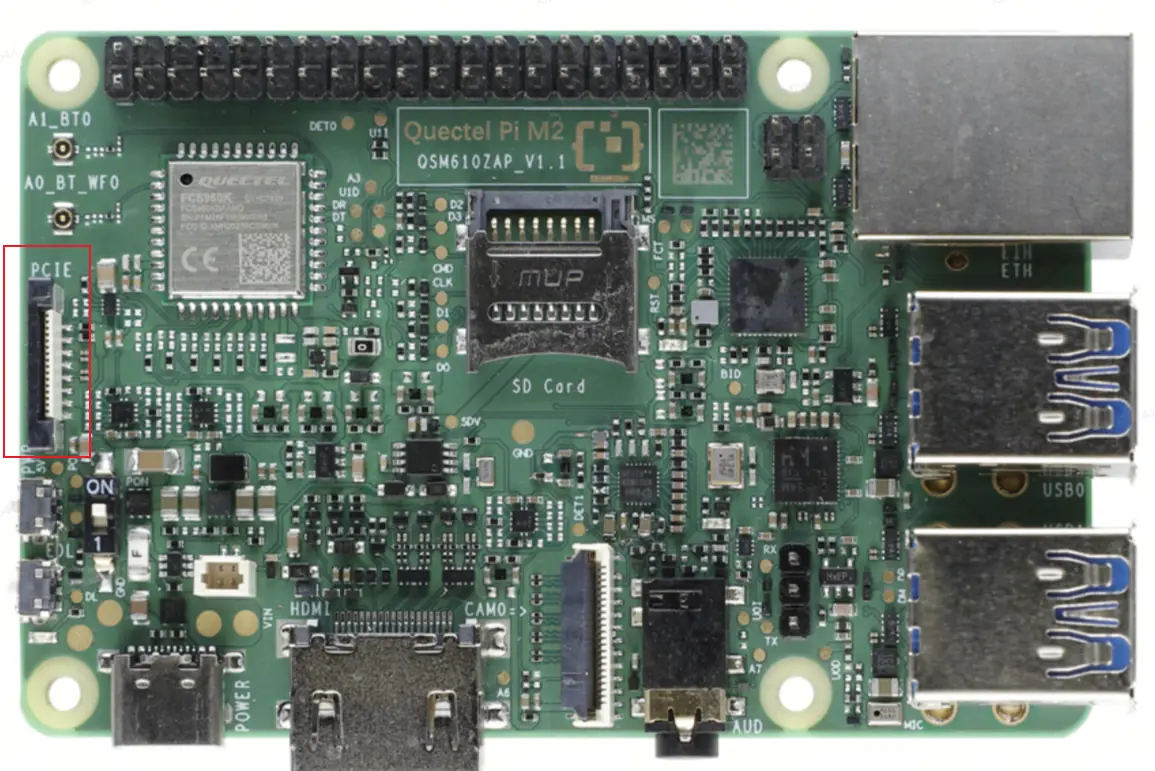
The Quectel Pi M2 board provides one onboard PCIe interface, RK3576 PCIe0 at 2a200000.pcie, through an M.2 slot. The slot can be used to connect a 5G PCIe module. This document describes the hardware connection, module mode configuration, PCIe/MHI detection, dial-up networking, and network connectivity verification. The H1 reference guide uses RM520N-GL as the example module. In the M2 ADB test used for this document, the device was identified as a Quectel EM120R-GL LTE Modem. Therefore, all measured output in this document refers to the logs collected on the M2 during this test.
💡 The M.2 slot can accommodate only one PCIe device at a time. The 5G module and the NVMe SSD are mutually exclusive and cannot be used simultaneously. Before switching devices, shut down the board properly, disconnect the power, replace the M.2 device, and then power on the board again.
Hardware Interface and Preparation
Before starting, prepare the following hardware: a Quectel Pi M2 main board, an RM520N-GL PCIe module, a PCIe adapter cable, a Type-C-to-Type-A USB cable, a 5G antenna, and a valid SIM card. For the first-time module configuration, connect the USB AT port on the module or adapter board to a Windows PC so that AT commands can be sent.
Quick Start
Connect the Hardware
Insert the RM520N-GL PCIe module adapter cable evenly into the PCIe connector on the main board.
Push the retaining brackets on both sides of the PCIe connector downward and make sure the adapter cable is firmly secured.
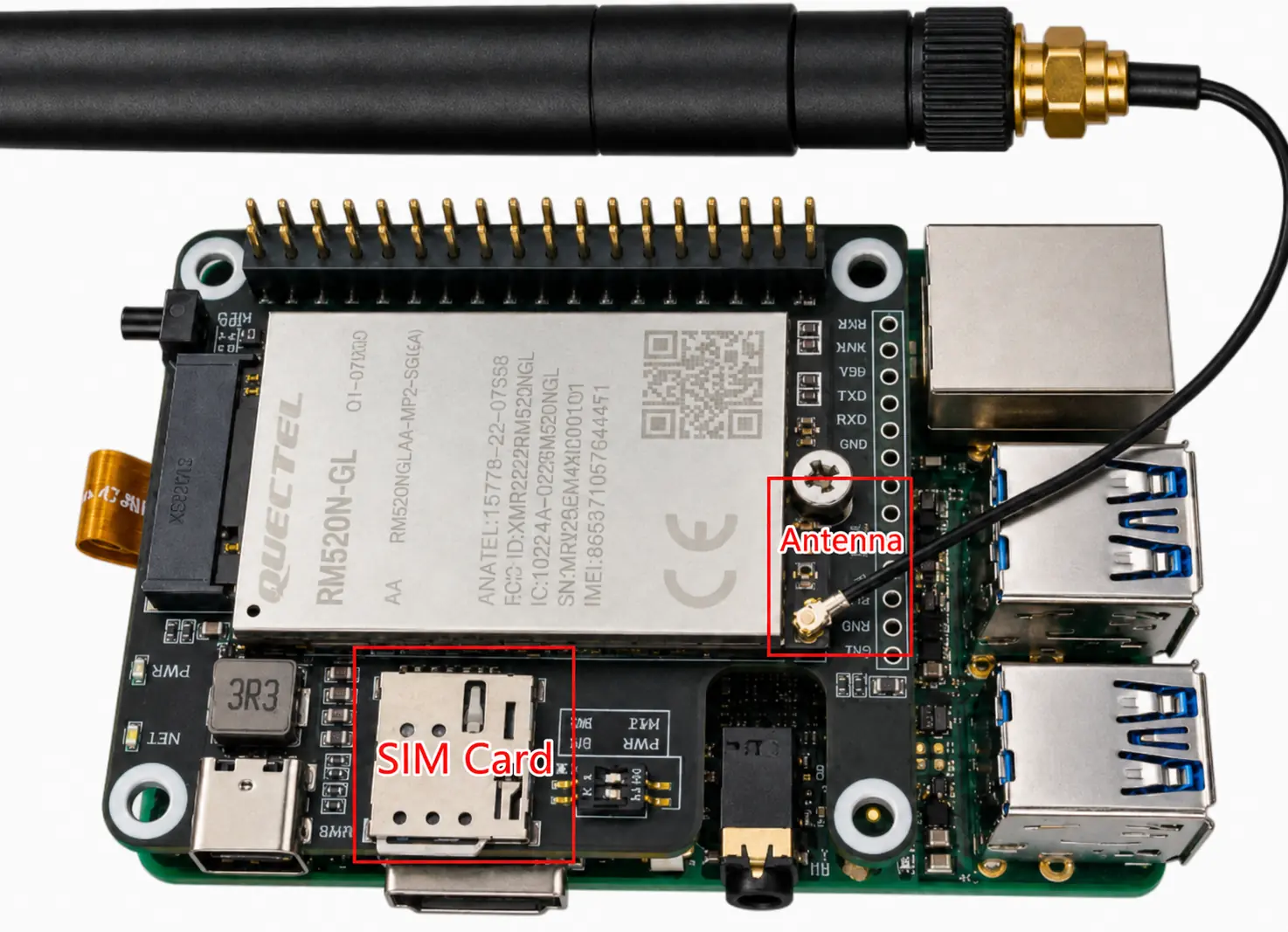
Install the 5G antenna and insert a valid SIM card.
Use a Type-C-to-Type-A USB cable to connect the USB port on the 5G module or adapter board to a Windows PC. During first-time use, the module USB driver may need to be installed. Obtain the driver package according to the actual module model.
After completing the module mode configuration, disconnect the USB cable from the PC and power-cycle the main board.
Feature Usage
PCIe Module Configuration
Connect to the AT Port
When using a PCIe pass-through adapter board, the 5G module must first be configured in PCIe-EP mode. Otherwise, it cannot communicate with the PCIe interface on the main board. After connecting the USB AT port, locate Quectel USB AT Port (COMxxx) in Windows Device Manager, and then open the AT port with a serial terminal tool.
Execute the Configuration Commands
Run the following commands in sequence on the AT port:
AT+QCFG="data_interface",1,0
AT+QCFG="pcie/mode",0
AT+QCFG="usbnet",2
AT+CFUN=1,1
A normal response is shown below:
AT+QCFG="data_interface",1,0
OK
AT+QCFG="pcie/mode",0
OK
AT+QCFG="usbnet",2
OK
AT+CFUN=1,1
OK
After the commands are executed, wait for the module to reboot and apply the settings. Then disconnect the USB cable from the PC and power-cycle the main board.
Verify PCIe Device Detection
After entering Linux, check whether the PCIe bus device, MHI device nodes, and data network interfaces have been created correctly.
# Check PCIe bus device detection
lspci

# Check MHI modem interfaces
ls /dev/mhi*

# Check data network interfaces
ls /sys/class/net | grep rmnet
Measured output on the M2:
root@linaro-alip:~# lspci
00:00.0 PCI bridge: Rockchip Electronics Co., Ltd RK3576 (rev 01)
01:00.0 Unassigned class [ff00]: Qualcomm Technologies, Inc SDX62 [Snapdragon X62 5G]

root@linaro-alip:~# find /sys/bus/pci/devices -maxdepth 1 -mindepth 1 -printf "%f\n"
0000:01:00.0
0000:00:00.0

root@linaro-alip:~# ls /dev/mhi*
/dev/mhi_BHI  /dev/mhi_DIAG  /dev/mhi_DUN  /dev/mhi_LOOPBACK  /dev/mhi_QMI0

root@linaro-alip:~# ls /sys/class/net | grep rmnet
rmnet_mhi0
rmnet_mhi0.1
Key kernel log output:
[  297.193333] rk-pcie 2a200000.pcie: PCIe Link up, LTSSM is 0x130011
[  297.193341] rk-pcie 2a200000.pcie: PCIe Gen.2 x1 link up
[  297.205513] mhi_pci_probe pci_dev->name = 0000:01:00.0, domain=0, bus=1, slot=0, vendor=17CB, device=0308
[  297.215019] [I][mhi0][mhi_pci_show_link] LnkCap: Speed 16GT/s, Width x2
[  297.215021] [I][mhi0][mhi_pci_show_link] LnkSta: Speed 5GT/s, Width x1
[  297.230051] [I][mhi0][mhi_pm_st_worker] Transition to state:MISSION MODE
[  297.258869] rmnet_vnd_register_device(rmnet_mhi0.1)=0
The measured results on the M2 are as follows: the PCIe device has been enumerated; lspci detects both the RK3576 PCI bridge and the Qualcomm SDX62 5G device; /dev/mhi* nodes have been created; and the data network interfaces rmnet_mhi0 and rmnet_mhi0.1 have been created. The kernel log shows that the PCIe Gen2 x1 link is up and that MHI has entered Mission Mode.
Dial-up Networking
Pre-checks Before Dial-up
Before dialing, make sure that the 5G antenna is connected, the SIM card is inserted and working normally, and the local cellular signal is sufficient for network registration. Poor signal quality or an abnormal SIM card may cause registration failure or prevent the device from obtaining an IP address after dial-up.
Use quectel-CM for Dial-up
Run quectel-CM in the background to start dial-up:
quectel-CM &
When the log shows SIM_READY, PS: Attached, DataCap: 5G_SA or another carrier network type, and udhcpc obtains an IP address, the device has successfully obtained an IP address from the cellular network and the network connection has been established.
Measured output on the M2:
root@linaro-alip:~# quectel-CM &
[04-13_21:51:02:574] QConnectManager_Linux_V1.6.4
[04-13_21:51:02:575] netcard driver = pcie_mhi, driver version = V1.3.7
[04-13_21:51:02:575] qmap_mode = 1, qmap_version = 9, qmap_size = 15360, muxid = 0x81, qmap_netcard = rmnet_mhi0.1
[04-13_21:51:02:575] Modem works in QMI mode
[04-13_21:51:15:237] requestBaseBandVersion RM520NGLAAR03A04M4G
[04-13_21:51:15:256] requestGetSIMStatus SIMStatus: SIM_READY
[04-13_21:51:15:260] requestGetProfile[1] ///0/IPV4V6
[04-13_21:51:15:265] requestRegistrationState2 MCC: 460, MNC: 0, PS: Attached, DataCap: 5G_SA
[04-13_21:51:15:268] requestQueryDataCall IPv4ConnectionStatus: DISCONNECTED
[04-13_21:51:15:623] requestSetupDataCall WdsConnectionIPv4Handle: 0xe2b2aae0
[04-13_21:51:15:641] ip link set dev rmnet_mhi0 up
[04-13_21:51:15:646] ip link set dev rmnet_mhi0.1 up
[04-13_21:51:15:655] busybox udhcpc -f -n -q -t 5 -i rmnet_mhi0.1
udhcpc: started, v1.37.0
udhcpc: broadcasting discover
udhcpc: broadcasting select for 10.72.183.243, server 10.72.183.244
udhcpc: lease of 10.72.183.243 obtained from 10.72.183.244, lease time 7200
[04-13_21:51:15:713] ip -4 address add 10.72.183.243/29 dev rmnet_mhi0.1
[04-13_21:51:15:719] ip -4 route add default via 10.72.183.244 dev rmnet_mhi0.1
In the retest with a valid SIM card inserted, quectel-CM correctly detected QMI mode. The SIM status was SIM_READY, the network registration state was PS: Attached, the data capability was 5G_SA, and an IPv4 address, 10.72.183.243, was obtained through udhcpc.
Verify Network Connectivity
After dial-up succeeds, check the IP address of the data network interface and use ping to verify Internet connectivity:
# Show the network interface address
ifconfig rmnet_mhi0.1
ip addr show rmnet_mhi0.1

# Ping an external host through the 5G data interface
ping -c 4 -I rmnet_mhi0.1 8.8.8.8
Measured output on the M2:
root@linaro-alip:~# ip -4 addr show dev rmnet_mhi0.1
6: rmnet_mhi0.1: <NOARP,UP,LOWER_UP> mtu 1500 qdisc pfifo_fast state UP group default qlen 1000
    altname enx0250f4000001
    inet 10.72.183.243/29 scope global rmnet_mhi0.1
       valid_lft forever preferred_lft forever

root@linaro-alip:~# ip route
default via 10.72.183.244 dev rmnet_mhi0.1
10.72.183.240/29 dev rmnet_mhi0.1 proto kernel scope link src 10.72.183.243

root@linaro-alip:~# ping -c 4 -I rmnet_mhi0.1 8.8.8.8
PING 8.8.8.8 (8.8.8.8) from 10.72.183.243 rmnet_mhi0.1: 56(84) bytes of data.
64 bytes from 8.8.8.8: icmp_seq=1 ttl=110 time=61.2 ms
64 bytes from 8.8.8.8: icmp_seq=2 ttl=110 time=60.0 ms
64 bytes from 8.8.8.8: icmp_seq=3 ttl=110 time=59.0 ms
64 bytes from 8.8.8.8: icmp_seq=4 ttl=110 time=58.0 ms

--- 8.8.8.8 ping statistics ---
4 packets transmitted, 4 received, 0% packet loss, time 3003ms
rtt min/avg/max/mdev = 58.033/59.562/61.205/1.173 ms
The measured results show that rmnet_mhi0.1 obtained the IPv4 address 10.72.183.243/29, the default route points to 10.72.183.244, and a ping to 8.8.8.8 through the 5G data interface succeeds. All four packets were received, with 0% packet loss.
Troubleshooting
If the PCIe device is not enumerated, check that the PCIe adapter cable is inserted in the correct orientation and that the retaining brackets are fully locked. Make sure the module has been switched to PCIe-EP mode, then power off the board, reseat the cable, and power on the board again.
If no
/dev/mhi*device nodes are present, check whether the kernel MHI/PCIe drivers are loaded, and inspect the logs withdmesg | grep -Ei "pcie|mhi|rmnet".If dial-up fails or no IP address is obtained, check the SIM card, antenna, APN, carrier coverage, and the SIM and registration status in the
quectel-CMlog.If
PCIe Link Failappears during boot after the SIM card is inserted andlspcishows no output, power-cycle the board first. During debugging, you can also rebind the PCIe controller to trigger enumeration:echo 2a200000.pcie > /sys/bus/platform/drivers/rk-pcie/bind.To switch to NVMe SSD testing, stop dial-up first, shut down the board and disconnect the power, then remove the 5G module and install the SSD.