qpi-config
Copyright © Quectel Wireless Solutions Co., Ltd. 2026. All rights reserved.
qpi-config is a tool for configuring the features of the Quectel Pi M2 smart controller board. It supports the following functions:
Query the temperature of system module units;
Query the system CPU, memory, and storage status;
Configure Wi-Fi.
Query System Module Unit Temperature
Run the following command to query the module unit temperature:
sudo qpi-config dump temperature

Query System CPU, Memory, and Storage Status
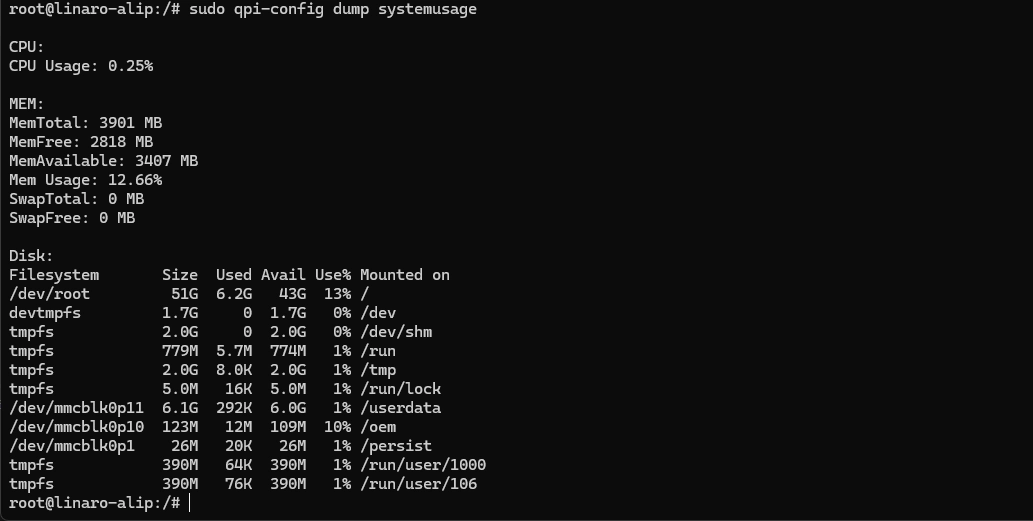
Run the following command to query the system CPU, memory, and storage status:
sudo qpi-config dump systemusage
Configure Wi-Fi
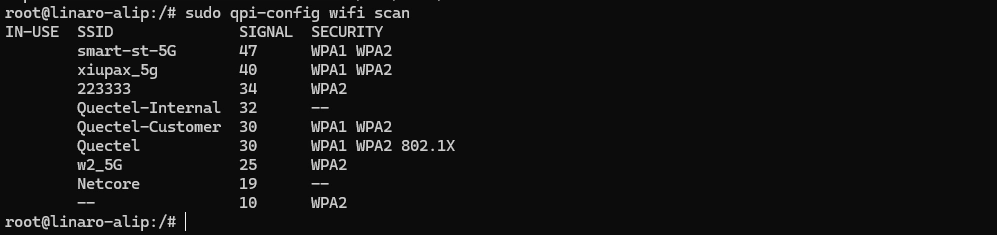
Run the following command to scan for Wi-Fi:
sudo qpi-config wifi scan
Run the following command to view existing Wi-Fi connections:
sudo qpi-config wifi show
Run the following command to add a Wi-Fi connection:
sudo qpi-config wifi connect <ssid> <passwd>
Run the following command to remove a Wi-Fi connection:
sudo qpi-config wifi remove <connection uuid>