应用程序开发
Copyright © Quectel Wireless Solutions Co., Ltd. 2026. All rights reserved.
应用启动流程与注册机制
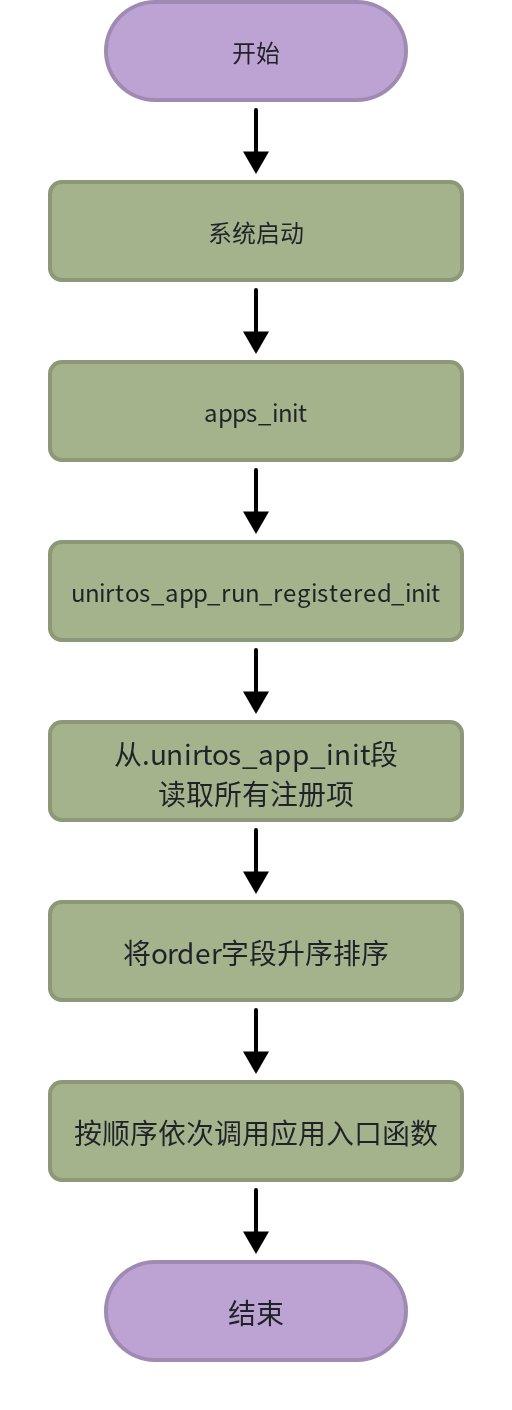
UniRTOS应用层的启动由SDK中 qos_applications/app_init/apps_init.c 统一管理。系统上电后调用 apps_init(),该函数通过链接器Section机制收集所有已注册的初始化入口,按优先级排序逐一调用。
入口函数调用链
外部应用注册
增加外部应用时使用 UNIRTOS_APP_EXPORT 注册外部应用的程序入口,源码定义位于SDK路径 qos_applications/app_init/unirtos_app_init_registry.h。
typedef void (*unirtos_app_init_fn_t)(void);

typedef struct
{
    unsigned short        order;   // Initialization order: the smaller the value, the earlier it executes
    const char           *name;    // Application Name
    unirtos_app_init_fn_t fn;      // Initialize function pointer
} unirtos_app_init_entry_t;

#define UNIRTOS_APP_EXPORT(order_value, entry_name, entry_fn)          \
    static const unirtos_app_init_entry_t __unirtos_app_init_##entry_fn \
    UNIRTOS_APP_INIT_USED UNIRTOS_APP_INIT_SECTION = {                  \
        order_value,                                                    \
        entry_name,                                                     \
        entry_fn                                                        \
    }
该宏调用后即完成注册,无需修改任何SDK内部文件。在系统启动时会自动调用已注册的函数入口。参考示例如下:
#include "qosa_def.h"
#include "qosa_sys.h"
#include "qosa_log.h"
#define QOS_LOG_TAG   LOG_TAG_DEMO

//Include the header file required for the UNIRTOS_APP_EXPORT
#include "unirtos_app_init_registry.h"

//Define the main process function for the hello world task
static void unir_hello_world_demo_process(void *ctx)
{
    /* Omit the specific implementation */
}

//Initialization function for the hello world demo
void unir_hello_world_init(void)
{
    /* Omit the specific implementation */
}
/*
* Parameter 1: 700    Order value, which determines the initialization sequence.
* Parameter 2: unir_hello_world_demo  Application entry name, must be unique within the same firmware.
* Parameter 3: unir_hello_world_init  Actual initialization function with the signature void fn(void).
*/
UNIRTOS_APP_EXPORT(700, "unir_hello_world_demo", unir_hello_world_init);
多应用注册
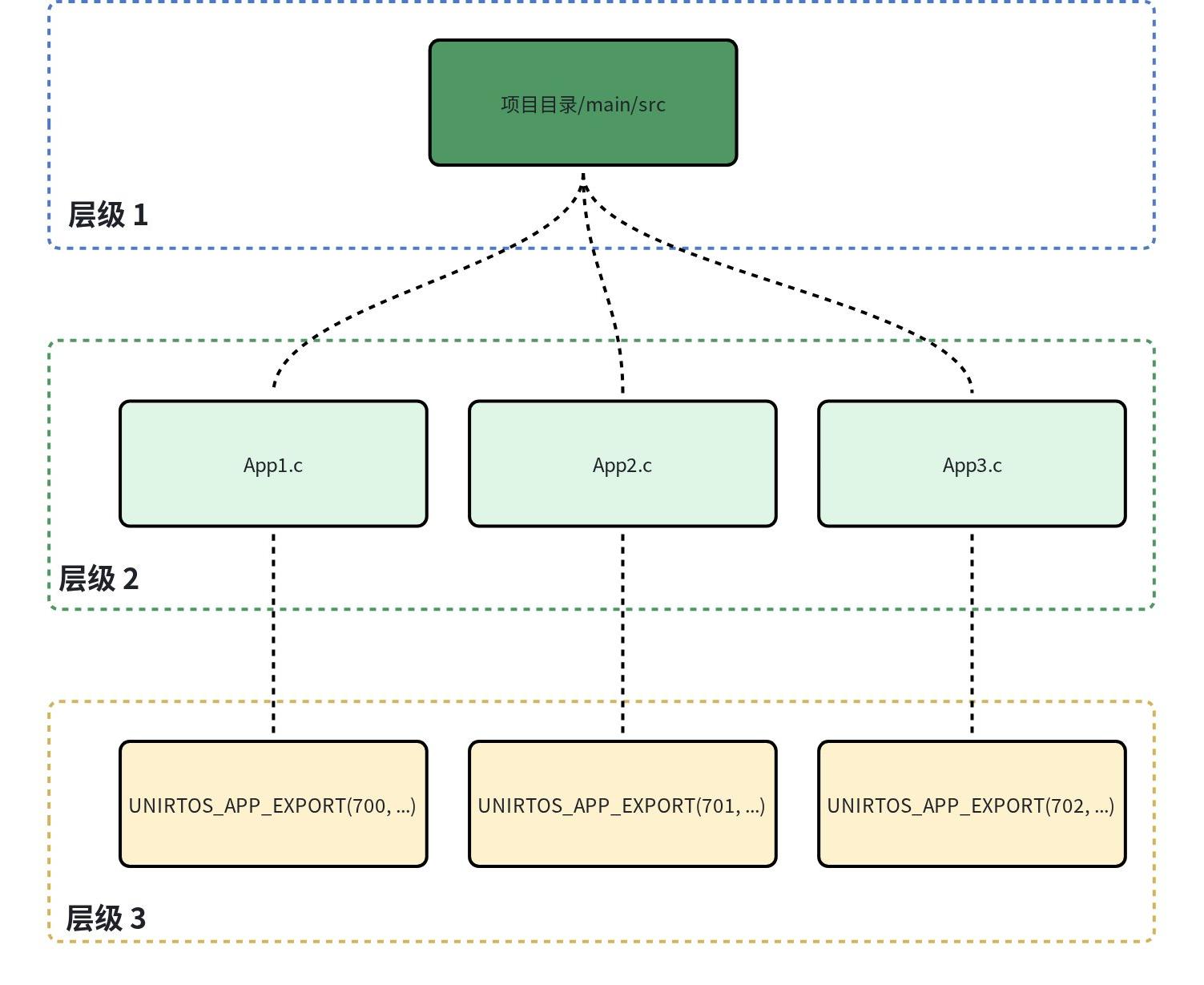
UniRTOS支持在同一项目中同时注册多个函数入口。通常情况下,项目只需注册一个函数入口即可。当项目中包含多个子应用时,开发者可在编写的子应用代码中使用 UNIRTOS_APP_EXPORT 分别注册对应的子应用程序入口即可。需要注意各个子应用的依赖关系,通过修改 UNIRTOS_APP_EXPORT 注册时的order参数值决定初始化顺序。多应用启动结构示意图如下:
应用开发示例
以开发一个“GPIO控制LED”应用为例,通过不断改变GPIO的输出电平,使LED达到闪烁的效果。
创建新项目
使用unirtos-cli工具创建一个新应用,应用名称为new-app。new命令详细说明 参考。在PowerShell窗口执行:
unirtos-cli new new-app -d E:\unirtos-cli_demos
拉取编译环境
创建项目成功后,当前目录下将生成 new-app 项目文件夹。进入该目录后,根据实际需要修改新建项目目录下的 env_config.json 配置文件,有关配置项的详细说明,请参考 配置文件说明文档。
env_config.json 配置文件示例:
{
  "unirtos_root": "",
  "build": {
    "module": "EG800ZCN_LA",
    "version": "EG800ZCNLAR01A01_BETA_OCPU_20260707",
    "jobs": 8
  },
  "sdk": {
    "version": "1.0.1",
  },
  "libraries": {
    "list": [
      {
        "name": "lib-name",
        "version": "2.0.0"
      }
    ]
  }
}
修改配置之后,在PowerShell窗口执行:
unirtos-cli env-setup
关键头文件说明
OS基础类型(qos_components/system/os/):
头文件 |
包含内容 |
|---|---|
qosa_def.h |
基础数据类型定义(qosa_uint8_t、qosa_int32_t等) |
qosa_sys.h |
系统级API声明(任务创建、信号量、互斥锁等) |
qosa_errno.h |
错误码定义 |
qosa_defer_time.h |
延时接口声明 |
常用外设接口(qos_components/system/hal/),以下仅以部分外设举例,其他外设可在目录下自行查看。
头文件 |
包含内容 |
|---|---|
qosa_adc.h |
ADC功能相关API声明,如“qosa_adc_get_volt()” |
qosa_gpio.h |
GPIO功能相关API声明,如“qosa_gpio_init()” |
qosa_uart.h |
UART功能相关API声明,如“qosa_uart_open()” |
qosa_iic.h |
I2C功能相关API声明,如“qosa_i2c_init()” |
常用组件头文件,通常需要在menuconfig中同步开启对应功能,以部分组件举例:
头文件 |
具体路径 |
包含内容 |
|---|---|---|
qcm_mqtt.h |
qos_components/components/qcm_mqtt/public/ |
MQTT组件功能相关API声明,如“qcm_mqtt_client_publish()” |
qcm_websocket.h |
qos_components/components/qcm_websocket/public/ |
Websocket功能相关API声明,如“qcm_ws_open_proc()” |
qcm_ntp_app.h |
qos_components/components/qcm_ntp/public/ |
NTP功能相关API声明,如“qcm_ntp_client_new()” |
当前仅介绍少许常用头文件路径,其他未提及的头文件均可在SDK的“qos_components/”路径下查询。
CMakeLists编写
UniRTOS中所有自定义模块(包括Demo和组件)都会编译成静态库(STATIC),由CMake管理。构建系统通过 add_apps_libraries() 将库路径汇总到全局变量 apps_libraries,最终统一参与链接。
编写CMakeList是为了将当前外部应用加入构建过程,模版 CMakeList.txt 位于项目目录下,参考如下:
message(STATUS "cmake config ${CMAKE_CURRENT_SOURCE_DIR}")

# This CMakeLists is designed to be imported by SDK root CMake via add_subdirectory.
# It follows the UniRTOS external app contract (same pattern as unirtos project create).

# Application target name: from environment variable or fallback to app root folder name.
if(DEFINED ENV{UNIRTOS_APP_TARGET_NAME})
    set(target $ENV{UNIRTOS_APP_TARGET_NAME})
else()
    get_filename_component(target ${CMAKE_CURRENT_SOURCE_DIR} NAME)
endif()
message(STATUS "UniRTOS app target name: ${target}")
add_apps_libraries($<TARGET_FILE:${target}>)
add_library(${target} STATIC)
set_target_properties(${target} PROPERTIES ARCHIVE_OUTPUT_DIRECTORY ${out_unir_lib_dir})

# Allow nested user components in common conventions.
# add_subdirectory_if_exist(app_components)

# SDK global include roots are exposed through SOURCE_TOP_DIR in SDK CMake.
target_include_directories(${target} PRIVATE
    ${SOURCE_TOP_DIR}
    ${CMAKE_CURRENT_SOURCE_DIR}/main/src
)

# Add your include directories here.
target_include_directories(${target} PUBLIC
    ${CMAKE_CURRENT_SOURCE_DIR}/main/inc
)

# Add your source files here.
file(GLOB_RECURSE APP_SRC
    ${CMAKE_CURRENT_SOURCE_DIR}/main/src/*.c
)

target_sources(${target} PRIVATE ${APP_SRC})

# Automatically link external libraries declared in env_config.json.
# This lets app sources include library headers and use library APIs directly.
set(_app_external_library_targets)
if(DEFINED UNIRTOS_EXTERNAL_LIBRARY_TARGETS AND NOT "${UNIRTOS_EXTERNAL_LIBRARY_TARGETS}" STREQUAL "")
        list(APPEND _app_external_library_targets ${UNIRTOS_EXTERNAL_LIBRARY_TARGETS})
endif()

get_property(_global_external_library_targets GLOBAL PROPERTY unirtos_external_library_targets)
if(_global_external_library_targets)
        list(APPEND _app_external_library_targets ${_global_external_library_targets})
endif()

if(_app_external_library_targets)
        list(REMOVE_DUPLICATES _app_external_library_targets)
        message(STATUS "[app-target-link] ${target} links external library targets from env_config: ${_app_external_library_targets}")
        target_link_libraries(${target} PUBLIC ${_app_external_library_targets})
endif()
基于unirtos-cli创建的模板工程,若新编写的应用源码与头文件分别位于 main/src 和 main/inc 目录下,则模板中的 CMakeLists.txt 无需额外配置——其内置规则会自动包含inc目录下的所有头文件,并将src目录中的所有 .c 源文件纳入编译。
若项目结构与模版略有不同,CMakeLists.txt 的主体结构也可完全复用,仅需关注如下两项:
头文件搜索路径,在 target_include_directories 当中补充自定义头文件目录,确保编译器可解析外部函数接口。
源文件所在路径,在 file(GLOB_RECURSE APP_SRC ${CMAKE_CURRENT_SOURCE_DIR}/main/src/*.c) 中增加或修改源文件所在路径,使之指向当前应用的源码存放位置,从而保证函数实现的正确链接。
逻辑脚本编写
逻辑脚本的编写只需正常导入头文件,调用相关API接口,实现需要的功能逻辑,最后使用 UNIRTOS_APP_EXPORT 宏注册对应的程序入口即可。UNIRTOS_APP_EXPORT 相关介绍请参考 外部应用注册。以调用GPIO相关API接口实现LED闪烁逻辑为例,编写逻辑脚本 led.c 并存放在项目目录下的 main/src 中,led.c 内容如下:
/*****************************************************************/ /**
* @file led_gpio.c
* @brief
* The demo initializes a GPIO pin connected to an LED, then toggles the LED on and off in a loop with a delay.
* @author lysander.li@quectel.com
* @date 2026-03-27
*
**********************************************************************/
#include "qosa_sys.h"
#include "qosa_gpio.h"
#include "qosa_pinctrl.h"
#include "qosa_def.h"
#include "qosa_log.h"
#include "unirtos_app_init_registry.h"

#define QOS_LOG_TAG   LOG_TAG_DEMO

#define UniRTOS_LED_DEMO_TASK_STACK_SIZE 1024  // Task stack size 1KB

#define UniRTOS_LED_DEMO_TASK_PRIO QOSA_PRIORITY_NORMAL // Normal priority

static qosa_task_t g_quec_test_demo_task = QOSA_NULL;

#define LED_PIN_NUM 19

qosa_pin_cfg_t pin_cfg; // Global variable to store the LED pin configuration, used for both initialization and level setting

/*
    Name: unir_led_init
    Description: Initialize the LED GPIO pin.
    @return 0 on success, 1 on failure
*/
static qosa_uint8_t unir_led_init(void)
{
    qosa_memset(&pin_cfg, 0, sizeof(qosa_pin_cfg_t));
    qosa_get_pin_default_cfg(LED_PIN_NUM, &pin_cfg);
    qosa_pin_set_func(LED_PIN_NUM, pin_cfg.gpio_func);
    // Initialize the LED GPIO pin as output, with pull-up and default level high (LED off)
    if (qosa_gpio_init(pin_cfg.gpio_num, QOSA_GPIO_DIRECTION_OUTPUT, QOSA_GPIO_PULL_UP, QOSA_GPIO_LEVEL_HIGH) != QOSA_GPIO_SUCCESS)
    {
        QLOGD("[led]Failed to initialize LED GPIO");
        return 1; // Return 1 on failure
    }
    QLOGI("[led]]LED GPIO initialized successfully, pin_num: %d, gpio_num: %d, level: %d", LED_PIN_NUM, pin_cfg.gpio_num, QOSA_GPIO_LEVEL_HIGH);
    return 0;
}

/*
    Name: unir_led_set
    Description: Set the LED GPIO level to on or off.
    @param gpio_level: The desired GPIO level for the LED, where QOSA_GPIO_LEVEL_LOW turns the LED on and QOSA_GPIO_LEVEL_HIGH turns it off.
    @return 0 on success, 1 on failure
*/
static qosa_uint8_t unir_led_set(qosa_gpio_level_e gpio_level)
{
    if(qosa_gpio_set_level(pin_cfg.gpio_num, gpio_level) != QOSA_GPIO_SUCCESS)
    {
        QLOGD("[led]]Failed to set LED GPIO level");
        return 1; // Return 1 on failure
    }
    return 0;
}

/*
    Name: unir_led_demo_process
    Description: The main process function for the TEST Demo, which initializes the LED and toggles it on and off in a loop.
    @param ctx: Task context pointer, reserved for future use, currently not used
    @return None
*/
static void unir_led_demo_process(void *ctx)
{
    unir_led_init();
    while (1)
    {
        unir_led_set(QOSA_GPIO_LEVEL_LOW);
        QLOGI("[led]]LED ON");
        qosa_task_sleep_ms(1000);
        unir_led_set(QOSA_GPIO_LEVEL_HIGH);
        QLOGI("[led]]LED OFF");
        qosa_task_sleep_ms(1000);
    }

}

/*
    Name: unir_led_demo_init
    Description: Initialize the TEST Demo, create a task to run the demo.
    @param None
*/
void unir_led_demo_init(void)
{
    // Log the entry of the TEST Demo initialization
    QLOGV("[led]]enter TEST DEMO !!!");

    // Create a task for the TEST Demo using qosa_task_create, with specified stack size, priority, name, and entry function
    if (g_quec_test_demo_task == QOSA_NULL) // Check if the TEST Demo task has already been created
    {

        qosa_task_create(
            &g_quec_test_demo_task,
            UniRTOS_LED_DEMO_TASK_STACK_SIZE,     // Task stack size
            UniRTOS_LED_DEMO_TASK_PRIO,           // Task priority
            "test_demo",                           // Task name
            unir_led_demo_process,                // Task entry function
            QOSA_NULL                             // Task context (not used in this case)
        );
    }
}

UNIRTOS_APP_EXPORT(700, "unir_led_demo", unir_led_demo_init);
配置额外功能
应用程序开发过程中,可能依赖若干UniRTOS系统默认关闭的功能组件,例如云平台对接常用的MQTT协议栈及 TLS加密库。此类组件默认未启用,开发者须在menuconfig配置界面中主动打开对应的宏控开关。该操作是正确引用组件头文件及调用其API接口的前提条件。在当前的“GPIO控制LED”应用中无需开启额外功能,因此无需进行配置。menuconfig的使用可参考 上文。
编译外部应用
在当前项目目录打开PowerShell窗口,执行命令:
unirtos-cli build
编译生成的固件位于项目目录的qos_build/release中,将固件烧录至目标开发板以验证功能即可。烧录固件 参考。
menuconfig功能选项
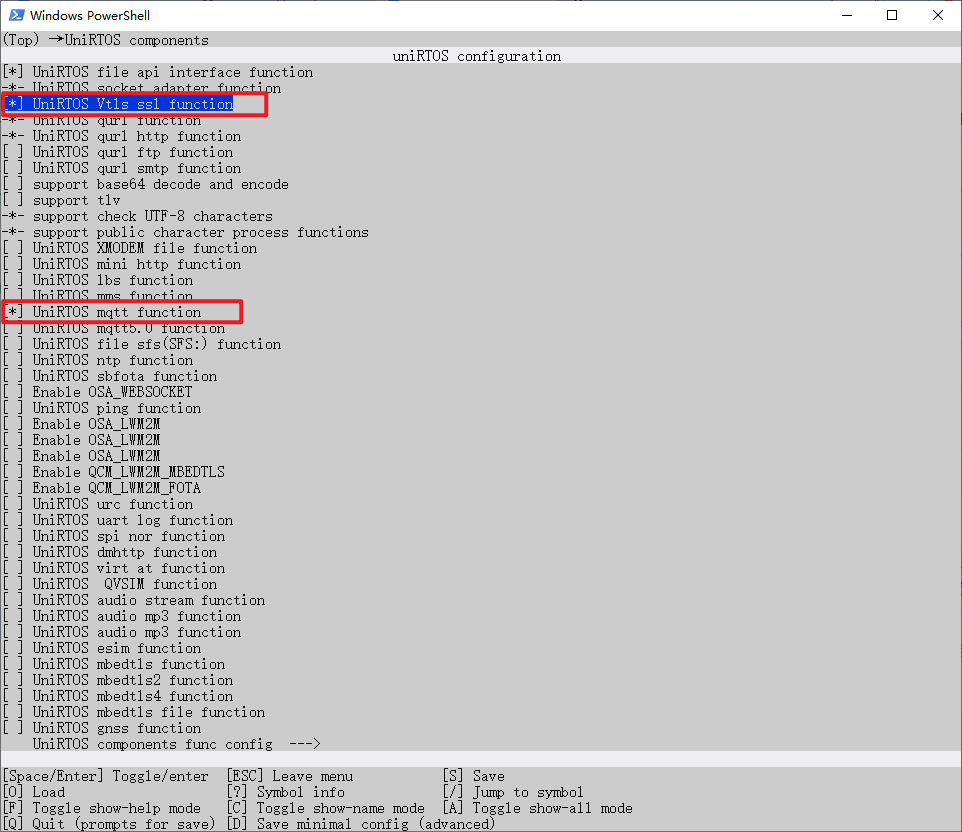
开发者可通过执行 unirtos-cli menuconfig 命令进入配置菜单,并依据应用需求启用相应的功能模块(如云平台连接场景下常需使能MQTT及VTLS等组件)。所有配置的功能选项最终会以宏控形式固化于项目目录下的 menuconfig/.config 文件中。在后续编译构建过程中,编译器将解析该文件的宏定义,并据此链接对应功能的静态库,以确保目标接口能够被正确解析和调用。
menuconfig配置
在对应工程目录下,使用 unirtos-cli menuconfig 命令进入配置界面。 以下演示在menuconfig菜单中开启VTLS和MQTT功能选项。
menuconfig保存
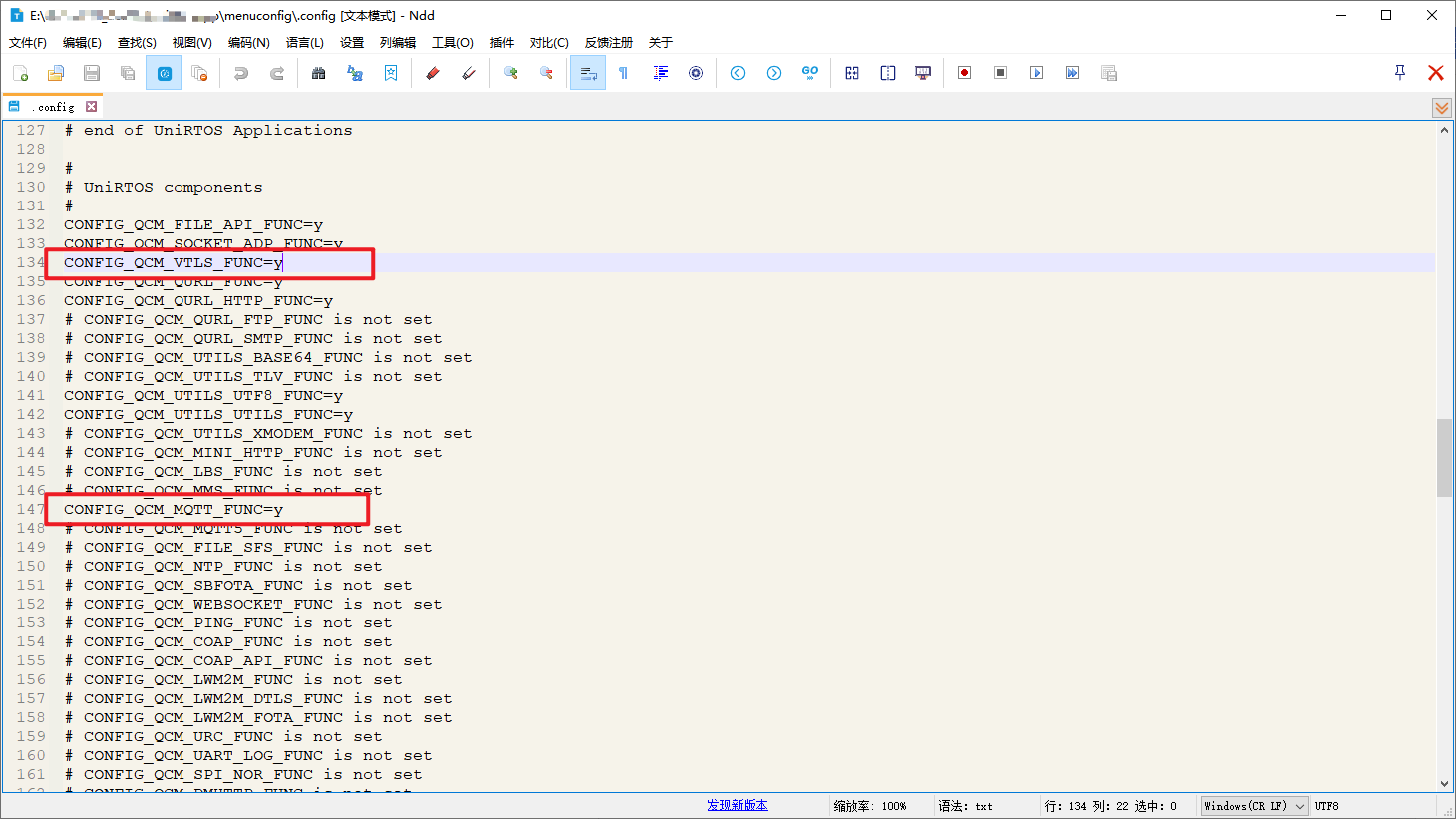
开启对应功能选项后,按下键盘“S”键保存,功能选项保存在 menuconfig/.config 中,对应宏控位置: